Are your campaigns not engaging all recipients as you expect? Do they fail to open your emails or click on links, lowering your campaign effectiveness and email marketing ROI? This phenomenon is natural, but it can be effectively minimised.
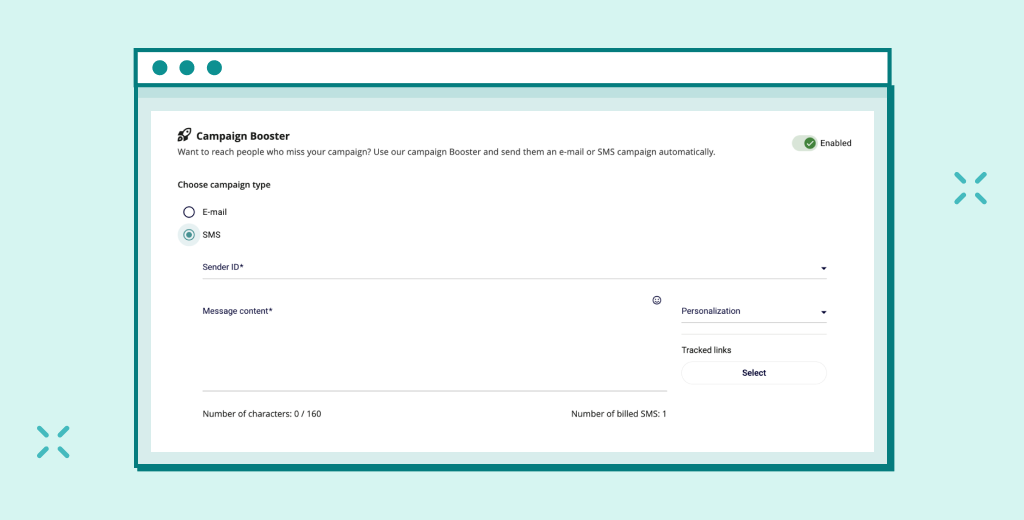
That’s why we proudly present Booster – an innovative feature in the EmailLabs web app that automates follow-ups to unengaged recipients. This precision tool automates the key process: re-engaging contacts who may have missed your first message, increasing your Open Rate, CTR, and conversion.
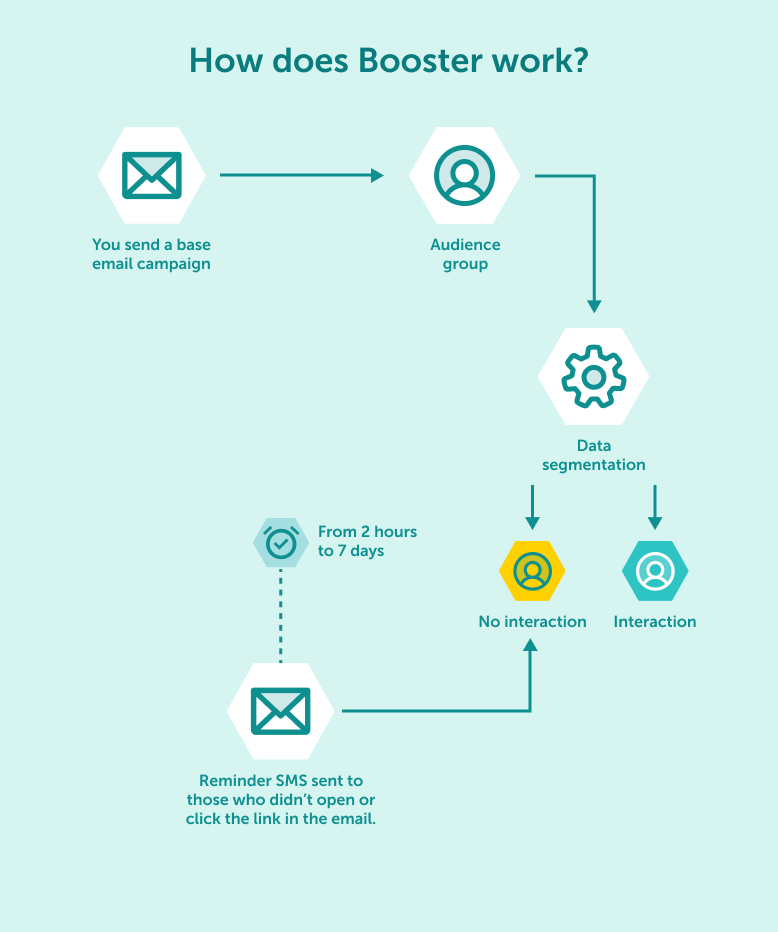
Booster is an advanced feature in the EmailLabs web app, designed to maximise the effectiveness of your marketing campaigns. The mechanism works by sending a second, single message (a follow-up campaign) only to those recipients who did not react to the initial send-out within your specified timeframe.
Booster is not just about automation – it provides concrete, measurable benefits for your email marketing strategy:
The entire configuration process takes just a few minutes, and Booster handles the rest. Unlike manual segmentation, the EmailLabs Booster feature works fully automatically. You configure it once when creating your campaign in our web application.
You can customize the messages and details for each follow-up channel to maximize engagement.
| Main Channel | Follow-up Channel | Dispatch Condition |
|---|---|---|
| SMS or email | No open or no click | |
| SMS | SMS | No click (message must contain a tracking link) |
| Push | SMS | No open or no click |
Important Note: For campaigns where the primary channel is SMS, Booster can only monitor whether a tracking link was clicked. This is due to technical limitations; it is not possible to track SMS message opens.
Example: An email campaign with a discount code -> if the email is not opened, Booster sends an SMS reminder about the code’s impending expiry.
Booster is a direct mechanism to increase the overall Open Rate and CTR of your entire campaign, as it effectively increases views and clicks relative to a single, main send-out.
Marketers using automatic follow-ups note significant metric improvements:
Booster works best in situations where time, urgency, and email engagement are crucial. Below are 4 practical cross-channel applications in various industries.
| Industry | Scenario | Channels | Business Benefit |
|---|---|---|---|
| E-commerce | Abandoned cart / Discount code: An email is sent with a reminder. If the email isn’t opened after 12h, an automatic SMS follow-up reminds them of the code’s expiry. | Email -> SMS | Finalising sales and recovering abandoned carts. |
| SaaS / Digital Products | New feature announcement: An email is sent informing about new features. If unopened after 3 days, a second, dedicated follow-up email is sent with a different, more intriguing subject line. | Email -> Email | Increasing retention and faster adoption of new functionalities. |
| B2B Events / Webinars | Last call before start: An email invitation to the webinar. If the recipient hasn’t clicked the confirmation link 24h before the start, an SMS follow-up is sent with a direct link to the webinar room. | Email-> SMS | Maximising attendance and reducing the no-show rate. |
| Retail / Beauty | Time-limited promotion: An email promotional catalogue is sent. An SMS follow-up with a “last hours” message is triggered 6h before the sale ends if the customer didn’t open the email. | Email -> SMS | Using urgency (scarcity) to increase sales conversion. |
Maximum effectiveness requires not just automation, but the right strategy. Follow these best practices to ensure your follow-up campaign yields the best results:
Maximize your email deliverability and security with EmailLabs!
No. Booster is a feature dedicated to bulk and marketing campaigns. It works only within the campaign creators available in the new EmailLabs web application (for panel sends). Our Email API is the platform’s strategic and key solution , specifically designed for high-deliverability, transactional communication and system sends, where the priority is the highest reliability and security.
No, you can set up an Email -> Email follow-up. However, we recommend testing cross-channel (Email -> SMS) as it increases the chances of conversion.
Yes, you have full control over the process and can cancel the planned Booster dispatch before it is automatically launched.
Don’t let your messages be forgotten. If you are still using the older version of the panel, contact our Sales Team to discuss a fast and seamless migration to the new web application. Gain immediate access to Booster and other advanced tools that will help you maximize the potential of every campaign!

Product and Technical Insights Specialist
Natalia abandoned her career as an experimental biologist for the digital universe and new technologies. She likes to know something about everything and everything about something. Breathlessly follows and describes news from the email world. Supports EmailLabs users in integrating, analyzing, and reporting deliverability. Helps to increase domain security with implemented DNS records and BIMI standard, moreover educates on good mailing practices.
See more articles
We live in a world where your customers switch seamlessly between laptops, smartphones, and tablets. They navigate a complex digital ecosystem – checking emails, using mobile apps, and reacting...

We are delighted to announce that Vercom S.A., the company behind the EmailLabs project, has successfully completed the ISO 22301 certification process. This significant achievement underscores our commitment to...

EmailLabs, as part of the Vercom group, proudly announces its full commitment to aligning its ICT services with the latest cybersecurity standards. In response to dynamically changing regulations, the...

We are pleased to announce that MessageFlow, a product from the Vercom S.A. group, has received the prestigious CSA (Certified Senders Alliance) Certification. This recognition not only underscores the...

AI, Antispam, Best practices, Deliverability
C-Level TL;DR: Strategic Takeaways Recipient consent as a foundation (Item 0): Sending email messages without explicit recipient consent (opt-in) poses a significant risk to your sending infrastructure. Attempting to...

AI, Antispam, Best practices, Deliverability
Executive TL;DR: Strategic Takeaways Deliverability Schism: The growing divide between sales automation technologies and the security standards enforced by major global mailbox providers (collectively referred to as MAGY) is...

Modern email systems no longer treat the primary inbox as the default destination for every message. The final classification of an email is the result of a multistage evaluation...
AI, Antispam, Best practices, Deliverability
C-Level TL;DR: Strategic Takeaways Recipient consent as a foundation (Item 0): Sending email messages without explicit recipient consent (opt-in) poses a significant risk to your sending infrastructure. Attempting to...
AI, Antispam, Best practices, Deliverability
Executive TL;DR: Strategic Takeaways Deliverability Schism: The growing divide between sales automation technologies and the security standards enforced by major global mailbox providers (collectively referred to as MAGY) is...
Modern email systems no longer treat the primary inbox as the default destination for every message. The final classification of an email is the result of a multistage evaluation...

Best practices, Maile marketingowe, Marketing E-mails, Transactional Emails
Mass email sending is a critical strategy for business owners, marketers, developers, and nonprofit managers looking to scale their outreach. Whether you are announcing a new product feature, distributing...

Best practices, Marketing E-mails
Customer feedback is the fuel for business growth, but gathering it effectively requires more than just a list of questions. Survey emails remain the most direct channel for understanding...

Best practices, Email Marketing, Pytania i odpowiedzi
Mail merge combines a template document with data to create personalized communications. This technique saves time by automatically generating individualized letters, emails, and labels without manual entry. What Is...

IT & Tech, Pytania i odpowiedzi, Technical
When an email travels from sender to recipient, it passes through several critical components of email infrastructure. At the heart of this journey sits the Mail Transfer Agent (MTA)...

Best practices, Deliverability, Google and Yahoo's Requirements, Pytania i odpowiedzi
The world of email marketing is constantly evolving, and leading mail service providers – Gmail, Yahoo, Microsoft, and Apple – regularly update their guidelines for senders. In recent years,...

Gmail, Google and Yahoo's Requirements
You might have noticed a new item in your Gmail sidebar recently – the “Manage subscriptions” tab, often flagged with a blue notification dot. While Google announced this feature...


