
Gmail, Google and Yahoo's Requirements
Gmail, Google and Yahoo's Requirements
You might have noticed a new item in your Gmail sidebar recently – the “Manage subscriptions” tab, often flagged with a blue notification dot. While Google announced this feature globally back in the summer, it is now hitting inboxes en masse across both personal and Google Workspace accounts.
From now on, instead of hunting through your history or scrolling to the footer of every individual email, users can review their top senders and unsubscribe from a single, centralized hub.
For email marketers, this is both a critical warning and a massive opportunity. Here’s what the change means for you and how to adapt your strategy to stay ahead before your audience starts hitting that new button.
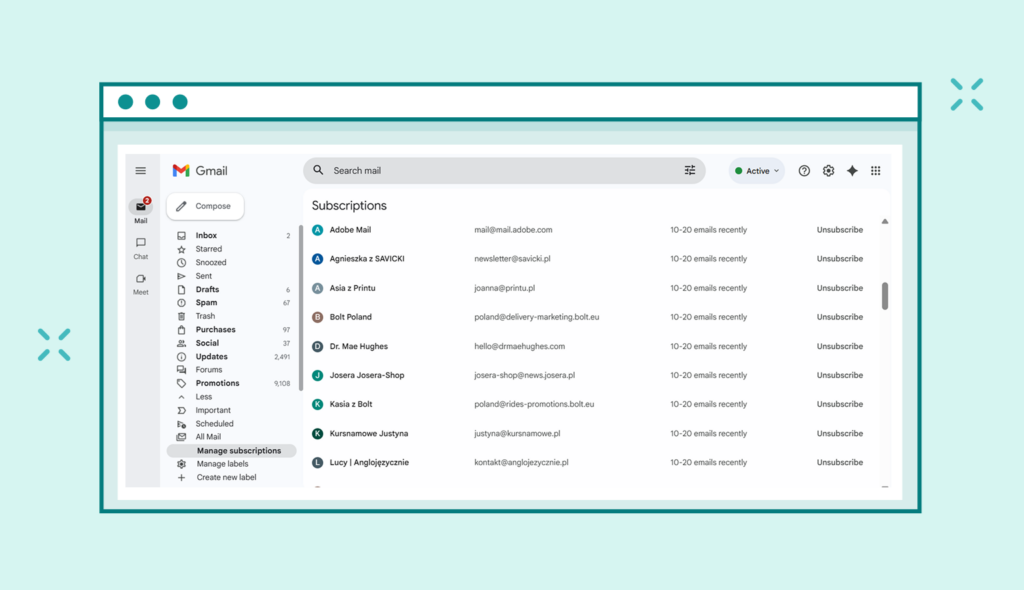
Think of “Manage Subscriptions” as a new control panel for your audience’s inbox. It automatically identifies senders who email you most frequently (grouping them by volume, e.g., “10-20 emails recently” or “10 or fewer emails recently”). It presents them in a clean list, displaying the brand logo and sending frequency.
Thanks to this, users can opt out with a single click of the “Unsubscribe“ button, without ever opening an email. The feature is now fully supported on the web version of Gmail and across updated mobile apps (Android and iOS).

Gmail gives users two ways to stop receiving emails, and the difference is critical for your sender reputation:
Unsubscribe: This is a formal opt-out request. Gmail uses the List-Unsubscribe header to process it. From a deliverability standpoint, this is a neutral signal. The removal process might take 48 hours up to a few days.

Block Sender: This is the danger zone. Blocking does not unsubscribe the user. Instead, it tells Gmail to send all future emails from your domain straight to the spam folder. For Google’s algorithms, this is a strong negative signal that can cripple your sender reputation and tank your deliverability.
With the “Manage subscriptions” hub, Gmail is guiding users toward the “Unsubscribe” option – the less damaging choice for senders. This is good news, but only if you’re prepared.
This new functionality relies on Gmail analyzing List-Unsubscribe headers and tracking user engagement. This is why the correct technical setup is no longer optional – it’s essential. Instead of searching for a footer link, the user simply goes to the tab and clicks “Unsubscribe.” Simple and effective.
The tool is a direct extension of the February 2024 mandates from Gmail and Yahoo, which require bulk senders to implement the One-Click Unsubscribe standard (RFC 8058). To be compliant, every email must contain:
This allows users to opt out with a single click, directly from their inbox, without leaving the app.
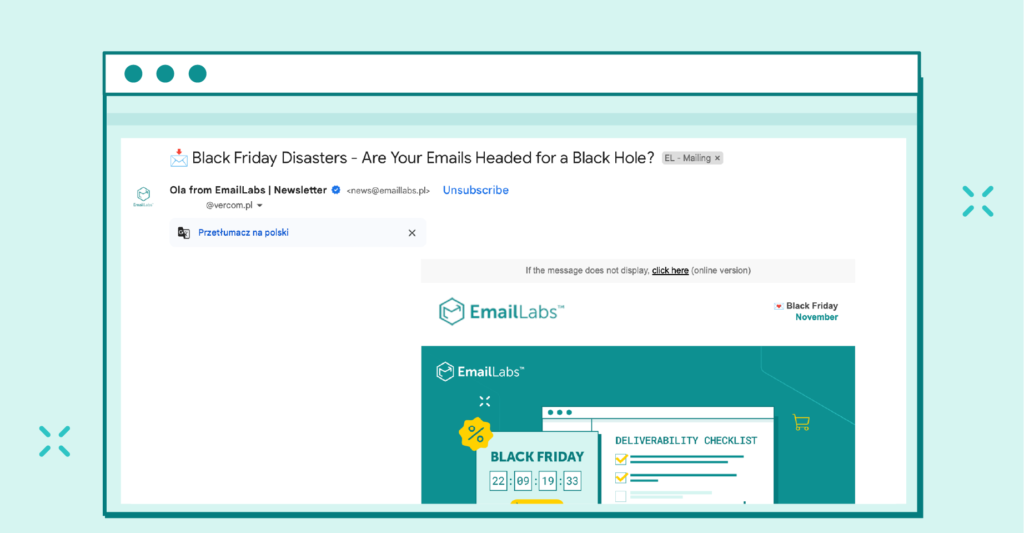
Warning: If your emails lack these headers, Gmail won’t identify them as subscriptions. Users won’t see the easy “Unsubscribe” option in the new hub and are far more likely to hit “Block” out of frustration.
We wrote more about this topic in our article on the One-Click Unsubscribe header.
Gmail identifies senders by domain or email address. This means a single click in the new interface could remove a user from all of your mailing lists tied to that domain. Gmail even displays a specific warning popup stating: “To stop getting messages from all mailing lists from [Sender]… go to their website to unsubscribe.”
This happens even if the user intentionally signed up for multiple streams, such as product news, blog updates, and special offers.
Recommendation: Invest in precise segmentation and give users real control. Consider using different subdomains or From: addresses for distinct communication streams. Above all, build and promote a Preference Center.
What is a preference center? It’s a dedicated page where users can manage their subscription settings. Instead of unsubscribing from all emails, they can precisely select the topics they’re interested in (e.g., promotions, new products, expert tips) and choose their preferred contact frequency. This gives subscribers greater control while allowing your brand to tailor its communication and maintain audience engagement.
The “Manage subscriptions” feature is useless if your headers are broken. Incorrectly configured headers like List-Unsubscribe: <mailto:[email protected]>, <https://example.com/unsubscribe> will lead to:
For marketers who prioritize value, list hygiene, and user choice, this change is a net positive. It leads to:
Stop fighting unsubscribes. Instead, make them unnecessary by delivering undeniable value and offering transparent choices.
Maximize your email deliverability and security with EmailLabs!
Here’s what you need to do right now:
This update is a powerful reminder that consent isn’t a one-time checkbox; it’s a relationship built on trust and value. Brands that live by this principle will thrive. Those that ignore technical standards and user experience will see their deliverability plummet.
Is Your Email Strategy Ready for Gmail’s New Rules? Contact our team for a free deliverability audit. We’ll help you ensure your emails meet the latest technical standards, protecting your sender reputation and keeping your messages in the inbox.

Product and Technical Insights Specialist
Natalia abandoned her career as an experimental biologist for the digital universe and new technologies. She likes to know something about everything and everything about something. Breathlessly follows and describes news from the email world. Supports EmailLabs users in integrating, analyzing, and reporting deliverability. Helps to increase domain security with implemented DNS records and BIMI standard, moreover educates on good mailing practices.
See more articles
We live in a world where your customers switch seamlessly between laptops, smartphones, and tablets. They navigate a complex digital ecosystem – checking emails, using mobile apps, and reacting...

We are delighted to announce that Vercom S.A., the company behind the EmailLabs project, has successfully completed the ISO 22301 certification process. This significant achievement underscores our commitment to...

EmailLabs, as part of the Vercom group, proudly announces its full commitment to aligning its ICT services with the latest cybersecurity standards. In response to dynamically changing regulations, the...

We are pleased to announce that MessageFlow, a product from the Vercom S.A. group, has received the prestigious CSA (Certified Senders Alliance) Certification. This recognition not only underscores the...

Modern email systems no longer treat the primary inbox as the default destination for every message. The final classification of an email is the result of a multistage evaluation...

Best practices, Maile marketingowe, Marketing E-mails, Transactional Emails
Mass email sending is a critical strategy for business owners, marketers, developers, and nonprofit managers looking to scale their outreach. Whether you are announcing a new product feature, distributing...

Best practices, Marketing E-mails
Customer feedback is the fuel for business growth, but gathering it effectively requires more than just a list of questions. Email surveys remain the most direct channel for understanding...
Modern email systems no longer treat the primary inbox as the default destination for every message. The final classification of an email is the result of a multistage evaluation...
Best practices, Maile marketingowe, Marketing E-mails, Transactional Emails
Mass email sending is a critical strategy for business owners, marketers, developers, and nonprofit managers looking to scale their outreach. Whether you are announcing a new product feature, distributing...
Best practices, Marketing E-mails
Customer feedback is the fuel for business growth, but gathering it effectively requires more than just a list of questions. Email surveys remain the most direct channel for understanding...

Best practices, Email Marketing, Pytania i odpowiedzi
Mail merge combines a template document with data to create personalized communications. This technique saves time by automatically generating individualized letters, emails, and labels without manual entry. What Is...

IT & Tech, Pytania i odpowiedzi, Technical
When an email travels from sender to recipient, it passes through several critical components of email infrastructure. At the heart of this journey sits the Mail Transfer Agent (MTA)...

Best practices, Deliverability, Google and Yahoo's Requirements, Pytania i odpowiedzi
The world of email marketing is constantly evolving, and leading mail service providers – Gmail, Yahoo, Microsoft, and Apple – regularly update their guidelines for senders. In recent years,...

Gmail, Google and Yahoo's Requirements
You might have noticed a new item in your Gmail sidebar recently – the “Manage subscriptions” tab, often flagged with a blue notification dot. While Google announced this feature...

IT & Tech, Pytania i odpowiedzi, Technical
Efficient email communication isn’t just about sending messages — it also involves integrating email functionality into your business systems and applications. Email APIs (Application Programming Interfaces) serve as the...

One of the most important yet often underestimated elements in shaping a company’s brand perception is the transactional email. In e-commerce, the design of such messages must be carefully...

