
Emails are a ubiquitous part of modern communication. Every day, a staggering 306.4 billion emails are sent and received worldwide. But have you ever wondered what happens after you hit the “send” button? How does your message travel from your inbox to your recipient’s?

Behind the scenes, there’s a complex process that takes place to ensure your emails reach their intended destination. At the heart of this process is an email protocol called SMTP – Simple Mail Transfer Protocol. This protocol is the critical engine that powers the sending of emails, and it’s time to demystify how it works.
In this article, we’ll dive into the world of SMTP, exploring the technicalities of how it sends emails from one account to another. We’ll look at the role of SMTP servers, how SMTP differs from other protocols, and when to consider using a dedicated SMTP relay service.
By the end of this article, you’ll have a better understanding of SMTP’s inner workings and be able to choose the right SMTP service for your needs.
Simple Mail Transfer Protocol, or SMTP for short, is an email protocol that enables the transfer of messages between different email accounts over the internet.
It’s a set of rules that allows clients and accounts to seamlessly exchange information. SMTP is one of the most widely used email protocols, alongside POP and IMAP, and it’s the only dedicated protocol for sending emails.
Major email clients such as Outlook, Apple Mail, Gmail, and Yahoo Mail depend on SMTP to transmit messages from the sender to the recipient.
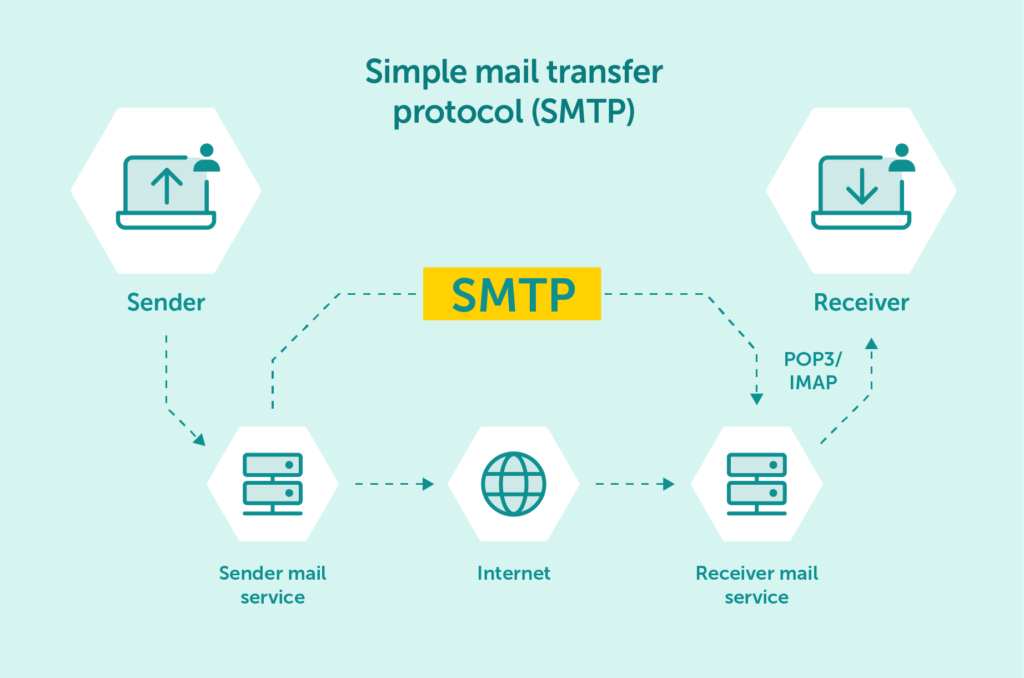
The SMTP server address is essential for establishing a connection between the email client and the server to facilitate the sending and receiving of messages. Without a valid SMTP server address, it would be impossible to send or receive email messages.
To understand how SMTP works, let’s take a closer look at the entire email-sending process. This includes the set of rules and commands that enable SMTP to function and the various errors that can occur during transmission. While it can get technical, we’ll do our best to break it down into bite-sized chunks.
The first thing to understand about the Simple Mail Transfer Protocol (SMTP) is that it operates through a series of commands. Each command is essentially a directive instructing the server on how to handle the email message.
We can distinguish 14 different commands under the SMTP protocol:
Unfortunately, the SMTP protocol isn’t always foolproof. The transmission of emails can sometimes be hindered by certain errors. These errors typically occur when the server fails to understand or execute the commands as instructed.
Below, you’ll find some of the most common SMTP transmission errors that can occur:
The electronic message data transfer process for SMTP involves six main steps that ensure all of your outgoing mail is delivered to its intended recipients:
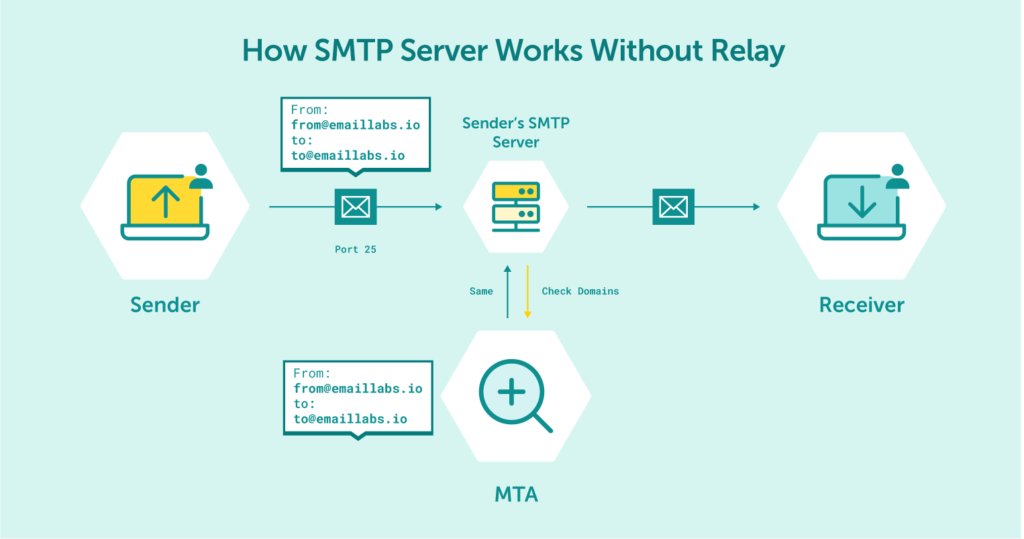
Simply put, when you hit the “send” button on your email service provider, it opens an SMTP connection to the server. It is established on a TCP (Transmission Control Protocol) connection, which enables the client to communicate with the server.
Next, the SMTP client uses commands to instruct the server on what to do and transfer the necessary data. This includes the sender’s email address, the recipient’s email address, and the email’s content.
At this point, the server uses the Mail Transfer Agent (MTA) to check if the email addresses belong to the same domain (like gmail.com). If they do, the server sends the email right away. But if they don’t, the server uses the Domain Name System (DNS) to identify the recipient’s domain and sends it to the appropriate server.
By following these six steps, SMTP ensures that your email messages are transferred seamlessly from sender to recipient. And while it’s a complex process that involves several technicalities, it’s all designed to ensure that your email arrives safely and securely in your recipient’s inbox.
Maximize your email deliverability and security with EmailLabs!
As we’ve previously mentioned, SMTP is just one of several email protocols in use today. POP and IMAP are the other two common email protocols, and they have their unique way of handling emails.
The primary difference between these email protocols lies in how they handle email transfers. SMTP is the only protocol used for sending or “pushing” emails from one unknown mail server to another. On the other hand, POP and IMAP are protocols designed for receiving or “pulling” mail from the recipient’s mail server.
While SMTP is ideal for transferring email to an unknown server, POP and IMAP are best suited for managing email within your network. They limit the transfer of mail to verified mail servers only, making them less suitable for sending emails to recipients outside your network.
Essentially, SMTP, POP, and IMAP serve different purposes in the email sending and receiving process. Let’s take a closer look:
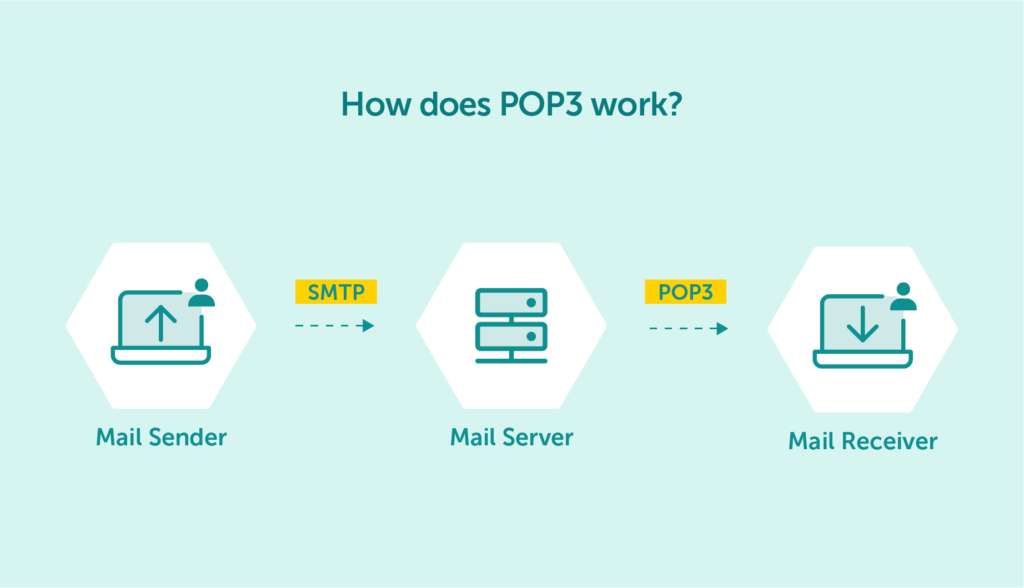
If you’re not familiar with Post Office Protocol (POP), it’s a protocol used to receive incoming messages. The latest version, POP3, was last updated way back in 1988.
POP gets its name from its ability to function like a real-life post office in the digital world. When using POP3, emails are received and held on the server until clients are ready to pick them up.
The emails are then downloaded and stored locally, making it an ideal solution for those who use only one computer to access their inbox. It’s also widely used by businesses to allow employees to check their emails while offline.
POP is a protocol designed to help you manage your incoming messages seamlessly. It offers a reliable and efficient way to download and store emails locally, making it a convenient solution for many users.
While SMTP is a message transfer protocol that’s used to send emails from one user to another, POP is a message access protocol that’s designed for receiving emails.
As such, SMTP is used twice in the email-sending process:
POP, on the other hand, is only used once, between the receiver and their mail server.
In simpler terms, SMTP is responsible for transferring email messages between servers and recipients, while POP allows you to access and manage your incoming email messages.
Internet Message Access Protocol (IMAP) is another email protocol that’s worth mentioning. As the name suggests, IMAP allows you to access your email messages via the internet.
Unlike POP, which downloads and stores email messages locally, IMAP stores email messages on a cloud server that can be accessed from any device.
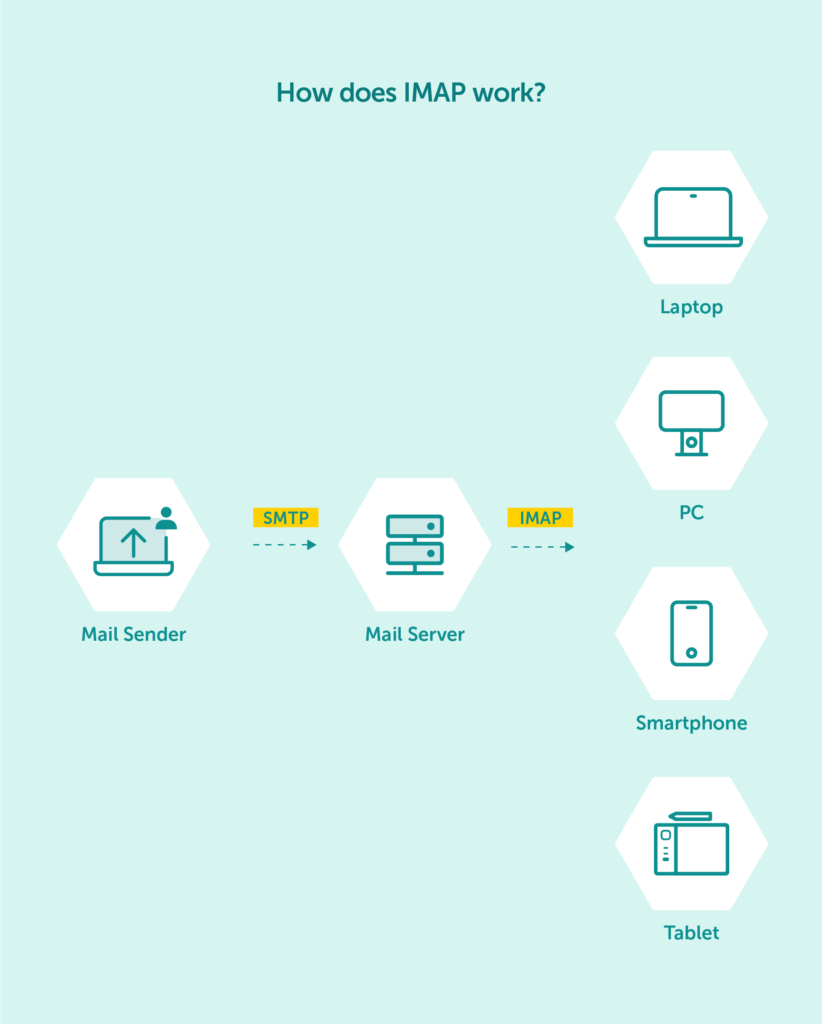
Using IMAP, you can easily authenticate and categorize your messages, which makes it a popular choice for many users. This approach to email management is more efficient and convenient, allowing you to access and manage your inbox from anywhere.
In summary, IMAP is an excellent email protocol that enables you to store your email messages on a cloud server and access them from any device with an internet connection. This makes it a preferred option for those who value convenience and efficiency when it comes to managing their emails.
SMTP handles outgoing emails and is responsible for sending messages from the sender’s email client to the recipient’s email server. On the other hand, IMAP is focused on handling incoming emails and allows you to access your email messages from the cloud server where they are stored.
SMTP is a message transfer protocol that facilitates the sending of email messages, while IMAP is a message access protocol that retrieves email messages from the cloud server where they are stored.
As your business grows, so does your email volume.
Initially, sending transactional emails from your website using the PHP mailer function or a free email provider like Gmail might suffice. However, to send larger volumes of emails, you’ll need a more robust SMTP service that can handle the load.
Free email providers impose strict daily sending limits, and exceeding these limits could damage a sender reputation or result in important emails being sent to the spam folder. This is where professional SMTP services come in.
One of the most significant benefits of using a dedicated SMTP relay service is better email deliverability. The SMTP server you use is associated with a specific IP address that ISPs (Internet Service Providers) use to check your sender reputation. Free email providers often have shared IPs that aren’t monitored closely, meaning you could be sending emails from the same server as a known spammer.
By using a dedicated provider, you can benefit from excellent deliverability for both marketing and transactional emails. It can help maintain strict control over all our shared IPs to ensure that users get their emails delivered to the inbox, not the spam folder.
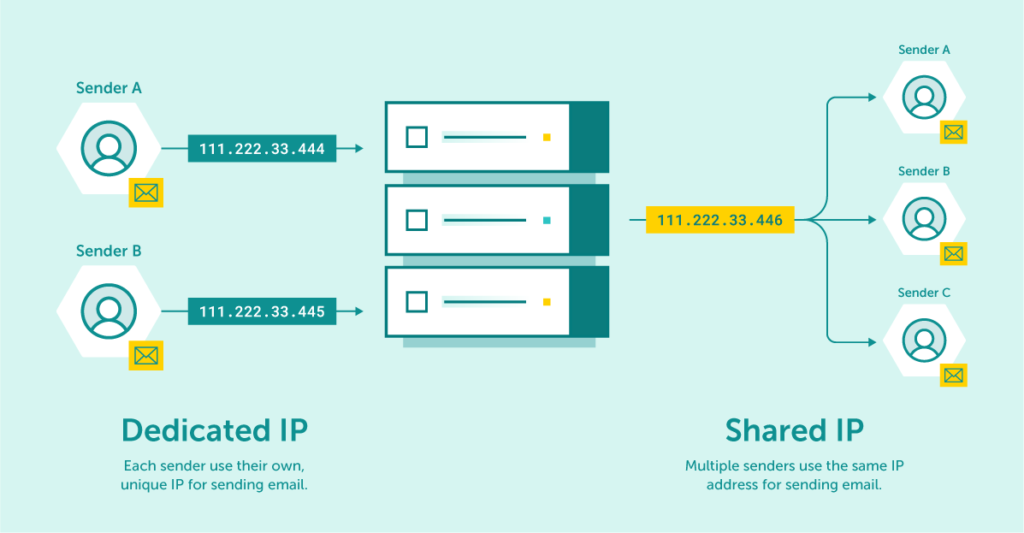
For high-volume senders, purchasing a dedicated IP address gives even more control over their sender reputation, eliminating the risk of other users’ sending behavior affecting your deliverability.
In summary, to send large volumes of email without running into deliverability and security issues or damaging your sender reputation, investing in a dedicated SMTP relay server is the way to go.
Choosing the best SMTP server for your business can be a daunting task, given the many options available. Here are some factors to consider when making your decision:
Ultimately, choosing the right SMTP service can mean the difference between successful email communication and a failed campaign.
When it comes to sending emails, you have the option of either running your own SMTP server or using a third-party email service provider. While running your own email server might give you more control, it also requires technical knowledge and can be time-consuming to manage.
By using a third-party provider like us, you can leave the technicalities to the experts and focus on your core business. Here are some of the pros and cons of using a third-party email service.
SMTP is the unsung hero that powers the sending of emails across the globe. Without this critical email protocol, our inboxes would be empty, and our communications would grind to a halt.
As we’ve explored in this comprehensive guide, the SMTP server lies at the heart of the email delivery process, ensuring that our messages reach their intended recipients in a timely and efficient manner. We’ve also seen how SMTP differs from other email protocols and why it’s essential to choose the right SMTP service for your needs.
Whether you’re a small business owner, a marketer or an individual looking to send emails on a regular basis, investing in a dedicated SMTP server can bring many benefits. Not only can it improve your email deliverability rates, but it can also help you avoid running into security issues and damaging your sender reputation.
Ultimately, understanding the role of SMTP servers and the email delivery process can help you make informed decisions about the email services you use. So, the next time you hit the “send” button, take a moment to appreciate the SMTP protocol working behind the scenes to make it all happen.
If you’re interested in cloud SMTP integration, whether it’s for an e-commerce platform or marketing automation, don’t hesitate to contact us and get started for free!

We are a group of specialists involved in developing substantive and engaging articles on emails and their deliverability. Our value is to be part of the team that creates the EmailLabs service on a daily basis, making our content fully responsive to our audience's questions and problems. Do you have any questions? We look forward to hearing from you :)
See more articles
We live in a world where your customers switch seamlessly between laptops, smartphones, and tablets. They navigate a complex digital ecosystem – checking emails, using mobile apps, and reacting...

We are delighted to announce that Vercom S.A., the company behind the EmailLabs project, has successfully completed the ISO 22301 certification process. This significant achievement underscores our commitment to...

EmailLabs, as part of the Vercom group, proudly announces its full commitment to aligning its ICT services with the latest cybersecurity standards. In response to dynamically changing regulations, the...

We are pleased to announce that MessageFlow, a product from the Vercom S.A. group, has received the prestigious CSA (Certified Senders Alliance) Certification. This recognition not only underscores the...

Modern email systems no longer treat the primary inbox as the default destination for every message. The final classification of an email is the result of a multistage evaluation...

Best practices, Maile marketingowe, Marketing E-mails, Transactional Emails
Mass email sending is a critical strategy for business owners, marketers, developers, and nonprofit managers looking to scale their outreach. Whether you are announcing a new product feature, distributing...

Best practices, Marketing E-mails
Customer feedback is the fuel for business growth, but gathering it effectively requires more than just a list of questions. Email surveys remain the most direct channel for understanding...
Modern email systems no longer treat the primary inbox as the default destination for every message. The final classification of an email is the result of a multistage evaluation...
Best practices, Maile marketingowe, Marketing E-mails, Transactional Emails
Mass email sending is a critical strategy for business owners, marketers, developers, and nonprofit managers looking to scale their outreach. Whether you are announcing a new product feature, distributing...
Best practices, Marketing E-mails
Customer feedback is the fuel for business growth, but gathering it effectively requires more than just a list of questions. Email surveys remain the most direct channel for understanding...

Best practices, Email Marketing, Pytania i odpowiedzi
Mail merge combines a template document with data to create personalized communications. This technique saves time by automatically generating individualized letters, emails, and labels without manual entry. What Is...

IT & Tech, Pytania i odpowiedzi, Technical
When an email travels from sender to recipient, it passes through several critical components of email infrastructure. At the heart of this journey sits the Mail Transfer Agent (MTA)...

Best practices, Deliverability, Google and Yahoo's Requirements, Pytania i odpowiedzi
The world of email marketing is constantly evolving, and leading mail service providers – Gmail, Yahoo, Microsoft, and Apple – regularly update their guidelines for senders. In recent years,...

Gmail, Google and Yahoo's Requirements
You might have noticed a new item in your Gmail sidebar recently – the “Manage subscriptions” tab, often flagged with a blue notification dot. While Google announced this feature...

IT & Tech, Pytania i odpowiedzi, Technical
Efficient email communication isn’t just about sending messages — it also involves integrating email functionality into your business systems and applications. Email APIs (Application Programming Interfaces) serve as the...

One of the most important yet often underestimated elements in shaping a company’s brand perception is the transactional email. In e-commerce, the design of such messages must be carefully...


