Running a business requires professional communication channels. While free personal email services might work for individual use, they fall short when representing a business.
Understanding the fundamentals of email hosting and choosing the right provider can significantly impact your business communication infrastructure.
Email hosting is a service that provides the infrastructure necessary to store, send, and receive emails using your own domain name (e.g., [email protected]) instead of using free email providers’ domains (e.g., [email protected]). This service involves dedicated mail servers that handle all your email traffic.
Unlike personal email services, professional email hosting offers specialized features designed specifically for business communication needs. The hosting provider maintains and manages the email servers, ensuring optimal performance, security, and reliability while you focus on your core business activities.
A proper email hosting setup includes:
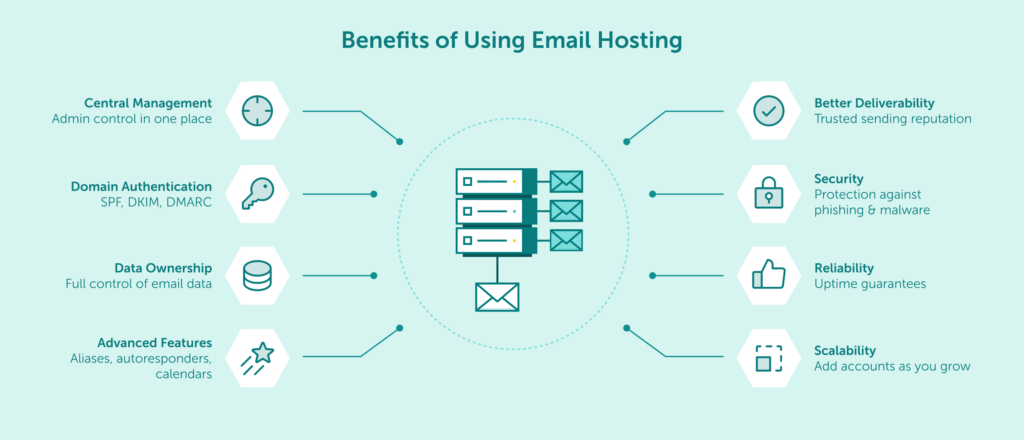
Implementing dedicated email hosting provides numerous advantages for businesses of all sizes.
Professional branding is perhaps the most immediate benefit, as custom email addresses strengthen your company’s identity and credibility. When clients receive communications from an address matching your domain name, it creates a cohesive brand experience and builds trust.
Other key benefits include:
| Benefit | Description |
|---|---|
| Better deliverability rates | Professional email servers have better sender reputation, reducing the chance your messages end up in spam folders |
| Enhanced security features | Business-grade protection against phishing, malware, and other email-based threats |
| Improved reliability | Dedicated infrastructure with uptime guarantees means fewer service interruptions |
| Scalability options | Easy addition of new email accounts as your business grows |
| Centralized management | Administrative controls for all company email accounts in one place |
| Full control over domain authentication | Ability to set up SPF, DKIM, and DMARC to prevent spoofing and boost deliverability |
| Data ownership | Complete control over your email data storage and management |
| Advanced functionality | Features like aliases, autoresponders, and shared calendars |
The email hosting market offers various solutions to match different business needs and budgets. Understanding the differences between these options helps in making an informed decision.
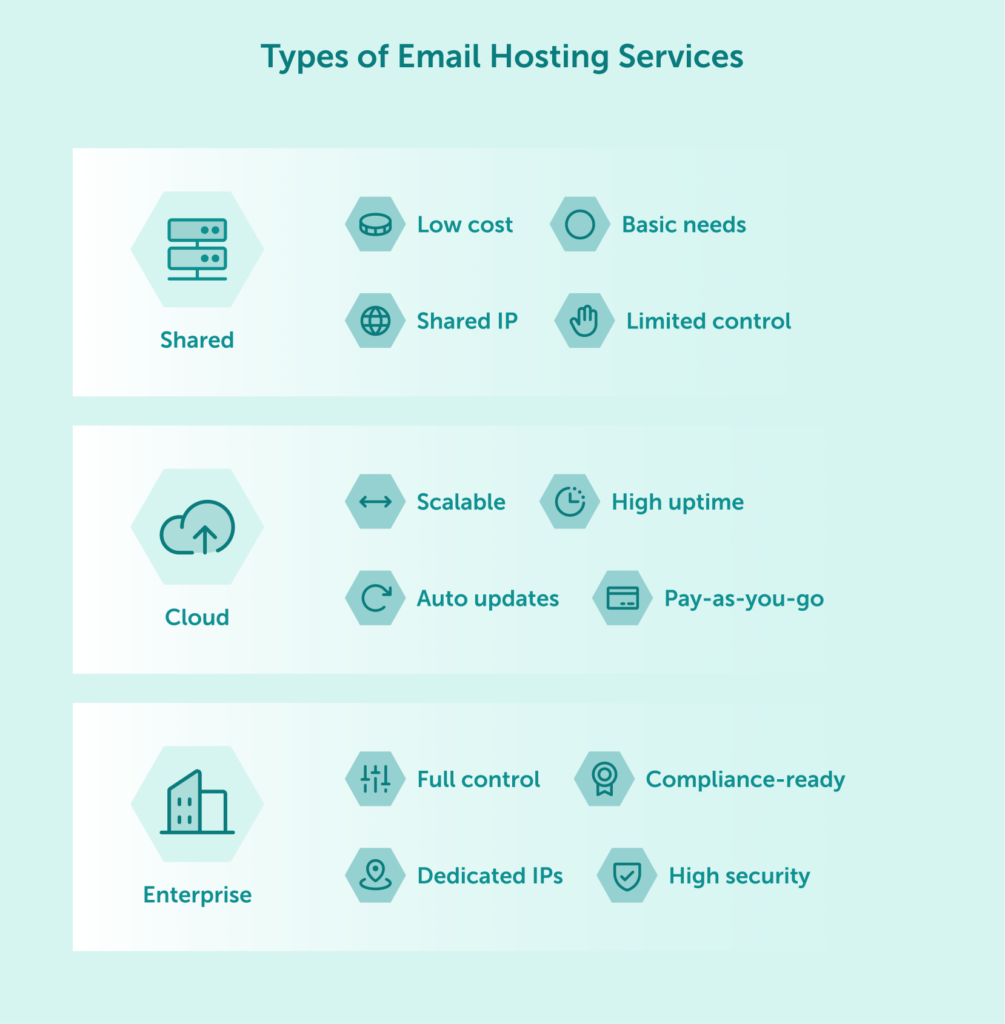
In shared hosting environments, multiple businesses use the same mail server and share its resources. This type of hosting is the most economical option, making it suitable for small businesses with limited email traffic and budget constraints.
Key characteristics of shared email hosting:
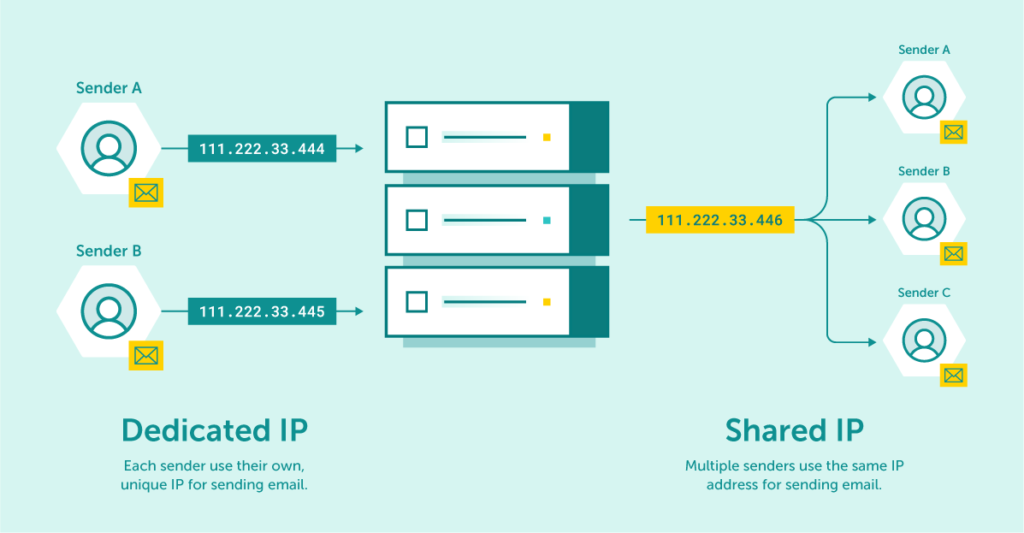
Shared hosting works well for startups and small businesses with modest email requirements. However, this setup means your email reputation partly depends on other users sharing the same server and IP address.
Cloud-based email hosting has grown increasingly popular due to its reliability and flexibility. These services distribute your email data across multiple servers in a cloud network, providing redundancy and improved availability.
Cloud email hosting offers:
This solution strikes a balance between cost and performance, making it suitable for medium-sized businesses and companies experiencing growth. The distributed nature of cloud infrastructure also means better protection against hardware failures.
Enterprise-grade email hosting provides dedicated resources specifically configured for your organization’s needs. These solutions offer maximum control, customization, and security, making them ideal for larger organizations with specific compliance requirements or high-volume email traffic.
Enterprise email hosting typically includes:
While more expensive than other options, enterprise solutions provide the robust infrastructure necessary for businesses that rely heavily on email communication or handle sensitive information.
When evaluating email hosting providers, certain features directly impact the service quality and user experience. Here are the critical factors to examine:
The amount of storage directly affects how many emails you can keep before needing to delete or archive them. Modern business communication often includes attachments and media files that quickly consume storage space.
When assessing storage options:
Look beyond the advertised numbers and consider your actual usage patterns when determining sufficient storage requirements.
Email remains one of the primary vectors for cyber attacks, making security a critical consideration. Robust email security protects sensitive business information and prevents unauthorized access to your communication channels.
Essential security features include:
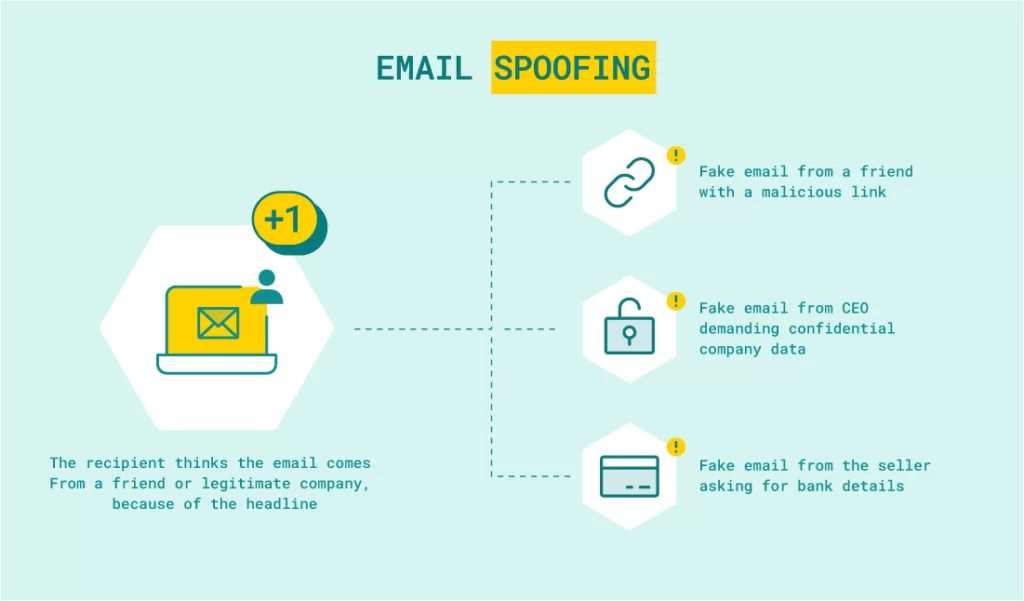
During some attacks, cybercriminals study the target of their attack very carefully to lull the recipients’ alertness. They use appropriate language and add characteristic data/phrases.
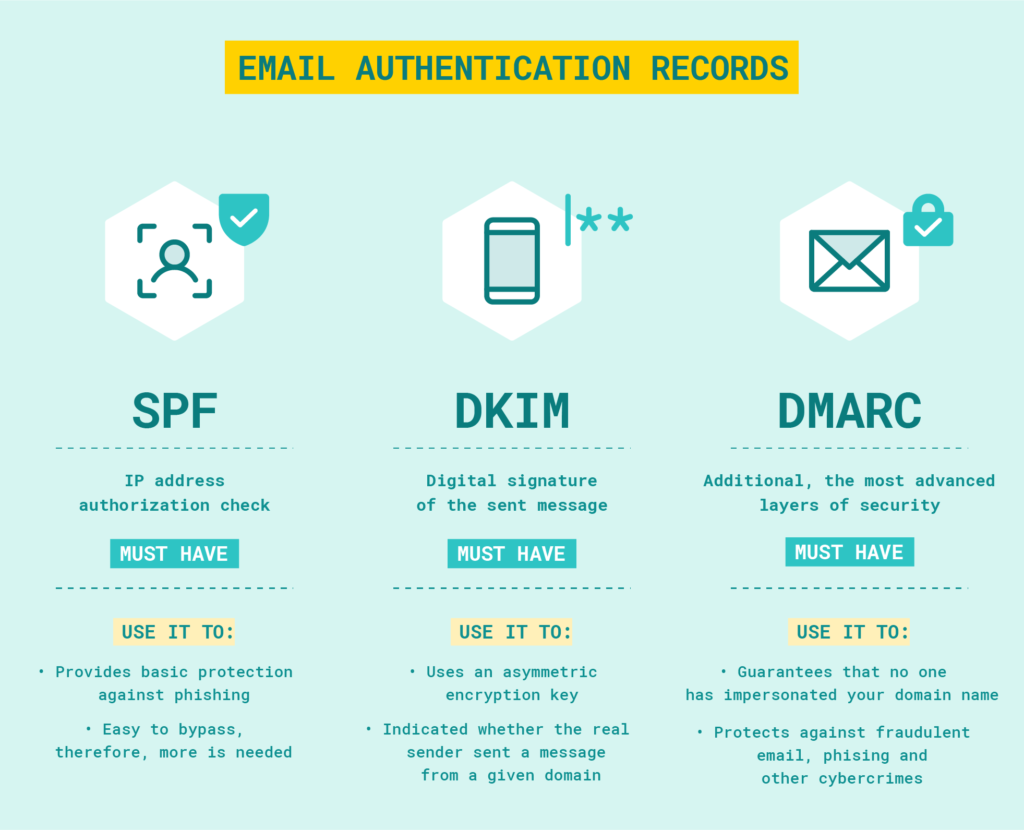
A quality email hosting provider should offer tools and guidance to help you implement these authentication protocols properly, ensuring your domain is protected against impersonation and your messages maintain strong deliverability.
Effective filtering tools prevent malicious content from reaching users’ inboxes while ensuring legitimate messages aren’t blocked. Comprehensive anti-spam and anti-virus protection saves time, improves productivity, and reduces security risks.
Look for providers offering:
These inbound protection features are essential for maintaining a clean, secure inbox environment for your team, protecting against phishing attempts, malware, and other email-based threats that could compromise your business.
Even with the most reliable systems, issues inevitably arise. When they do, responsive support becomes invaluable. The quality and availability of technical support can significantly impact how quickly problems are resolved and business communication restored.
Evaluate support offerings by checking:
Professional email hosting providers should offer expert-level support that can help you troubleshoot configuration issues, resolve deliverability problems, and optimize your email infrastructure for your specific needs.
Maximize your email deliverability and security with EmailLabs!
Selecting the optimal email hosting service requires careful consideration of your specific business requirements and provider capabilities.
Before comparing providers, clearly define what your organization requires. Understanding your specific needs helps narrow down options and ensures you don’t overspend on unnecessary features or underinvest in critical capabilities.
Key questions to consider:
Document these requirements to create a benchmark for evaluating potential providers.
Email is mission-critical for most businesses, making reliability a top consideration. Downtime directly impacts productivity and potentially damages client relationships, making it essential to choose a provider with proven uptime performance.
When assessing reliability:
Choose providers that offer 24/7 monitoring of their infrastructure and are willing to customize SLA agreements based on your business needs, ensuring maximum reliability for critical email communication.
Cost remains an important factor, but it should be evaluated in context with the features and value provided. The cheapest option rarely offers the best value when considering the full picture of features, performance, and support.
When comparing costs:
Seek competitive pricing with flexible options that scale with your business needs, particularly if you require reliable email delivery to specific geographic regions or have specialized compliance requirements.
Once you’ve selected a provider, proper setup ensures optimal performance and security from the start.
Your domain name becomes part of your email addresses and reflects your brand identity. If you don’t already have a domain, you’ll need to register one before setting up email hosting.
When registering a domain:
Many email hosting providers offer domain registration services, simplifying the process by keeping everything under one account.
DNS (Domain Name System) records direct email traffic to the correct servers. Proper DNS configuration is crucial for email delivery and security measures like SPF and DKIM.
Key DNS records for email hosting:
Your email hosting provider should supply all necessary DNS records and provide clear guidance on implementing proper authentication standards to ensure optimal deliverability and security.
With DNS properly configured, you can create individual email accounts for your team. A systematic approach to account creation ensures consistency and proper access management.
Best practices for account setup:
Proper ongoing management ensures your email hosting continues to perform optimally and securely.
Data loss can occur due to technical failures, human error, or security incidents. Regular backups protect your email communication history and ensure business continuity in case of unexpected events.
Effective backup strategies include:
Email security requires ongoing vigilance. Proactive monitoring helps identify and address potential threats before they cause significant damage.
Key monitoring practices:
Comprehensive monitoring and analytics help you track the health of your email infrastructure and quickly identify potential issues before they impact your business operations.
Email often contains sensitive information subject to various regulations. Compliance requirements vary by industry and region, making it essential to understand which rules apply to your business.
Compliance considerations include:
Choose hosting providers that maintain infrastructure compliant with relevant regulations, such as keeping servers within specific geographic regions (like the European Economic Area for GDPR compliance) to help your business meet its regulatory obligations.
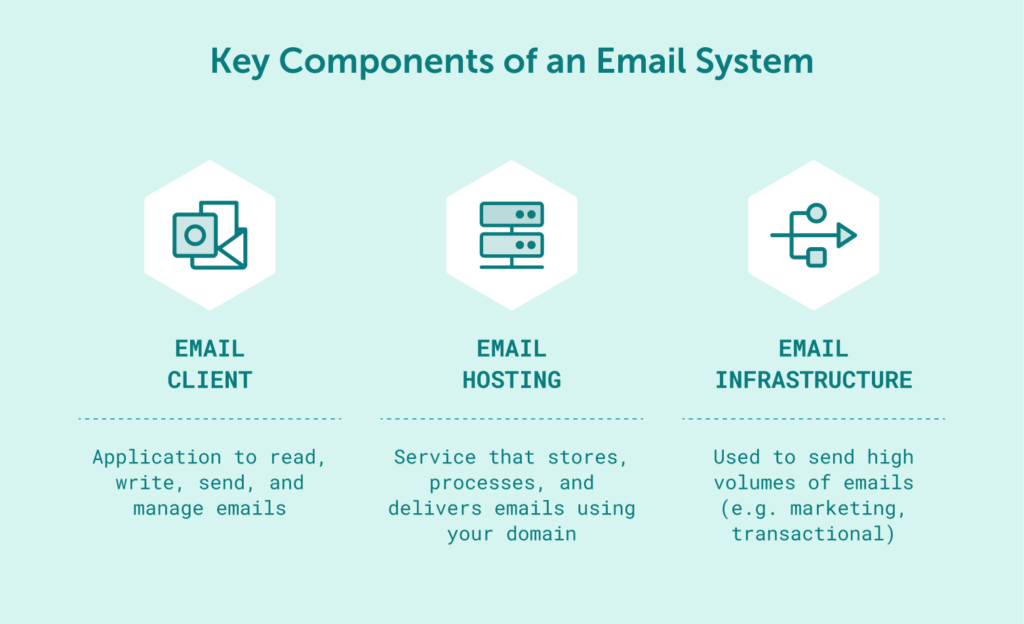
While your email hosting service provides the foundation for day-to-day business communication—managing mailboxes, storing messages, and handling incoming mail—there’s another critical component to consider: specialized sending infrastructure for high-volume outbound emails.
Marketing campaigns, transactional emails, automated notifications, and other bulk sending needs often require dedicated infrastructure separate from your hosting provider. This is where services like EmailLabs become valuable complements to your email hosting setup.
Why separate sending infrastructure matters:
EmailLabs offers a compelling solution for businesses that prioritize deliverability. Our expert-led approach, dedicated infrastructure, and localized knowledge of provider requirements ensure your most critical communications reliably reach the inbox. The platform provides TLS encryption and tools to help generate your SPF, DKIM, and DMARC records, while fully supporting messages using advanced client-side standards like BIMI and S/MIME.
For businesses with significant sending needs, combining reliable email hosting for daily communication with a specialized sending platform for marketing and transactional emails creates a robust, professional email infrastructure.
Email hosting is a fundamental component of business communication infrastructure that demands careful consideration. The right solution balances performance, security, features, and cost to meet your specific needs.
By understanding the different types of email hosting services, evaluating key features, and implementing best practices, you can establish a reliable and secure email system that supports your business operations and projects professionalism to your clients and partners.
When making your final decision, remember that email hosting is not just a technical service but a critical business tool that directly impacts your organization’s productivity, security, and professional image. Take the time to assess your needs thoroughly, compare providers carefully, and choose a solution that will support your business communication requirements both today and as you grow.

We are a group of specialists involved in developing substantive and engaging articles on emails and their deliverability. Our value is to be part of the team that creates the EmailLabs service on a daily basis, making our content fully responsive to our audience's questions and problems. Do you have any questions? We look forward to hearing from you :)
See more articles
We live in a world where your customers switch seamlessly between laptops, smartphones, and tablets. They navigate a complex digital ecosystem – checking emails, using mobile apps, and reacting...

We are delighted to announce that Vercom S.A., the company behind the EmailLabs project, has successfully completed the ISO 22301 certification process. This significant achievement underscores our commitment to...

EmailLabs, as part of the Vercom group, proudly announces its full commitment to aligning its ICT services with the latest cybersecurity standards. In response to dynamically changing regulations, the...

We are pleased to announce that MessageFlow, a product from the Vercom S.A. group, has received the prestigious CSA (Certified Senders Alliance) Certification. This recognition not only underscores the...
Compliance & Security, Email Marketing, Security
TL;DR DMARCbis is now official: After years of work by the IETF working group, the DMARC specification has been formally updated. Three new documents, RFC 9989, RFC 9990, and...

Email Marketing, Gmail, New feature
TL;DR Gmail Live: a new feature enabling natural language voice search in the inbox, powered by the Gemini model. AI Inbox and AI Overviews: a revamped inbox interface featuring...
Best practices, Best practices, Email Authentication
TL;DR: Strategic Takeaways for C-Level and Marketing Leaders DKIM2 is not a minor DNS configuration update. It is a systemic response to two critical business problems: Replay attacks: scenarios...
Compliance & Security, Email Marketing, Security
TL;DR DMARCbis is now official: After years of work by the IETF working group, the DMARC specification has been formally updated. Three new documents, RFC 9989, RFC 9990, and...
Email Marketing, Gmail, New feature
TL;DR Gmail Live: a new feature enabling natural language voice search in the inbox, powered by the Gemini model. AI Inbox and AI Overviews: a revamped inbox interface featuring...
Best practices, Best practices, Email Authentication
TL;DR: Strategic Takeaways for C-Level and Marketing Leaders DKIM2 is not a minor DNS configuration update. It is a systemic response to two critical business problems: Replay attacks: scenarios...

AI, Antispam, Best practices, Deliverability
C-Level TL;DR: Strategic Takeaways Recipient consent as a foundation (Item 0): Sending email messages without explicit recipient consent (opt-in) poses a significant risk to your sending infrastructure. Attempting to...

AI, Antispam, Best practices, Deliverability
Executive TL;DR: Strategic Takeaways Deliverability Schism: The growing divide between sales automation technologies and the security standards enforced by major global mailbox providers (collectively referred to as MAGY) is...

Modern email systems no longer treat the primary inbox as the default destination for every message. The final classification of an email is the result of a multistage evaluation...

Best practices, Maile marketingowe, Marketing E-mails, Transactional Emails
Mass email sending is a critical strategy for business owners, marketers, developers, and nonprofit managers looking to scale their outreach. Whether you are announcing a new product feature, distributing...

Best practices, Marketing E-mails
Customer feedback is the fuel for business growth, but gathering it effectively requires more than just a list of questions. Survey emails remain the most direct channel for understanding...

Best practices, Email Marketing, Pytania i odpowiedzi
Mail merge combines a template document with data to create personalized communications. This technique saves time by automatically generating individualized letters, emails, and labels without manual entry. What Is...


