With the emergence of the Covid-19 pandemic, many brands have been challenged to adapt in a short period to the changed reality and new consumer attitudes. That meant reorganizing their distribution channels, thus moving all (or a large part) of their business online. This, in turn, has resulted in phishing becoming one of the most common forms of cybercrime.
Today it goes beyond fake websites only – although we mainly hear about them in the context of recent attempts to impersonate the biggest Polish banks. Phishing is also a practice of sending fraudulent emails under the guise of recognizable and reputable brands. This aim is to persuade recipients to share personal information, such as user passwords or bank details – e.g., credit card numbers.
The simplest example of an attempted scam is the well-known messages asking for an urgent transfer as a necessary payment to receive an inheritance from a foreign prince. Most of us will probably smile politely and say that we would never fall for this type of scam.
However, it is important to be aware that current forms of phishing are more advanced, far better prepared, and more difficult to detect – many imitate 1:1 communication of real brands, which makes it so easy to fall victim to them.
Gone are the days when it was enough to look at the content of a message to recognize at first glance a fraud attempt due to a poorly prepared email with “scattered” HTML elements.
One solution for reducing the risk of becoming a victim of phishing scams is implementing authentication protocols and BIMI – an emerging email specification that allows you to verify the authenticity of an email sender.
Below, we explore this and other ways you can use for anti-phishing shield in greater detail.
Maximize your email deliverability and security with EmailLabs!
An email address is one of the easiest pieces of information to find out about another person online. Everyone has used it many times to subscribe to a newsletter, create an account on a website, complete an online purchase or send a resume.
Along with the coming into force of the GDPR, we have acquired many rights to know how someone came into possession of our data and how it is processed, giving us more control over its use. However, not everyone is aware that due to various hacking attacks, databases can be stolen and, once leaked, illegally sold.
The Darknet is full of offers concerning the sale of confidential information that comes from hacks into IT systems. It is a good practice to check from time to time whether your email address was involved in the security incident and the disclosure of data. For instance, you can do this via the Have I Been Pwned website.
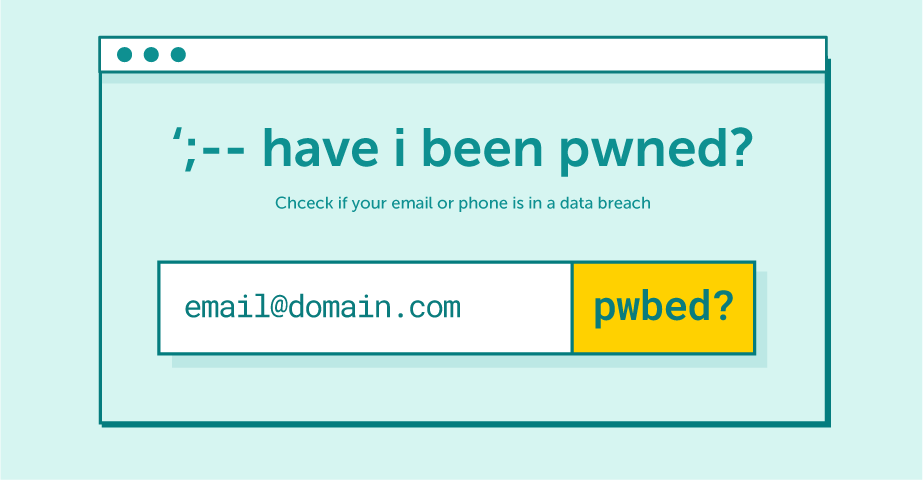
Have I Been Pwned allows you to search through multiple data breaches to see if your email address has been compromised.
What should you do if you have already received a suspicious email? There are several things you need to check to see if the message you have received is a fraudulent attempt:
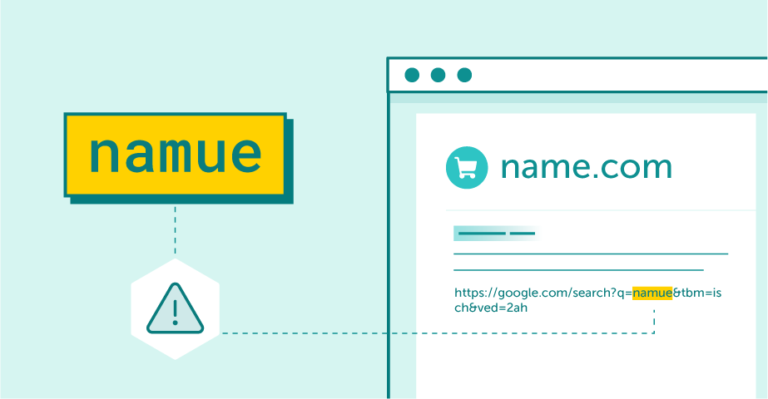
Sign of a scam: bad grammar and misspelled words
A more advanced method of verifying the credibility of a received email is to check its headers, which allows it to confirm the real sender of the message and assess whether it is properly authenticated via SPF, DKIM, and DMARC.
Mailboxes often automatically move messages that fail validation of the above email authentication protocols to the spam folder, but many still end up in other tabs due to their less restrictive policy settings.
It’s important to note that until now, DMARC was the highest level of domain security – the only one that (thanks to its reporting feature) allowed us to verify who else was sending messages via our domain, thus alerting us to fraud attempts.
However, nowadays, very similar domain names are often used to impersonate the sender – a change of letters or replacement of one of them with another sign makes it more challenging to distinguish them at first glance.
Many brands have set their sights on helping an “average” recipient differentiate real email messages from fake ones. Very interesting articles, podcasts, or webinars are created for this purpose as well. Unfortunately, despite the energy and involvement in educational campaigns, information about phishing reaches only a narrow group of recipients.
The e-commerce industry has been waiting for a long time for a solution that would enable the recognition of a trusted, verified sender who has properly secured his domain at first glance. After all, not every recipient reads the detailed information contained in the header.
The answer to this need is BIMI.
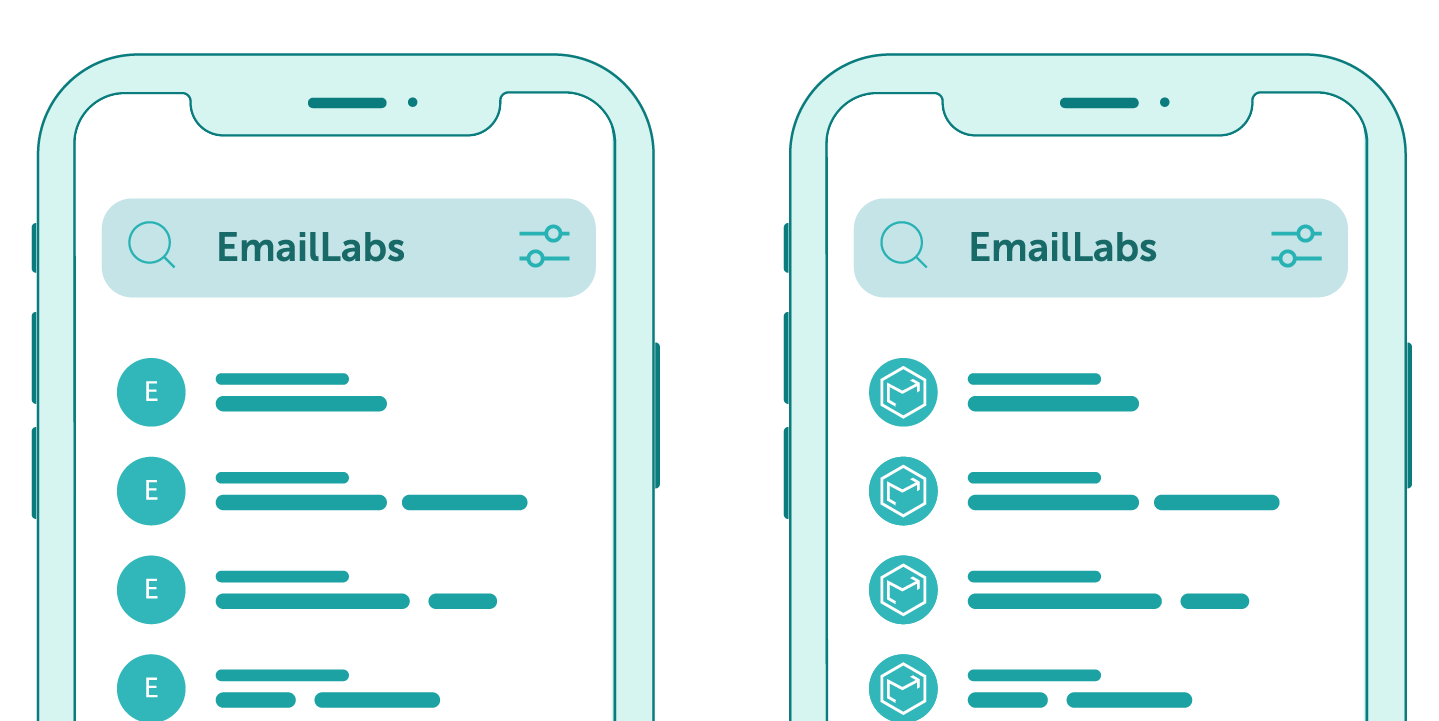
BIMI stands for Brand Indicators for Message Identification, which describes a new security standard that allows sender logos, i.e., a brand’s logo, to be displayed in emails within supporting email clients.
The aim of this solution is twofold: on the one hand, it is meant to protect users from phishing attempts, and on the other hand, it allows legitimate brands to confirm their identity.
At the moment, several major mailbox providers support BIMI: Gmail (which requires an additional verified mark certificate, or VMC), Fastmail, and Yahoo! Several other email providers have expressed their willingness to join the program soon and, considering the predictions of marketers and trends described by them for 2022, it has a chance to become an extremely popular standard.
Admittedly, there are other ways to add a logo, such as our native Boost from Interia, the logo in Google Workspace (formerly G Suite), the Avatar in the Postmaster Mail.ru tool, and Bing for Microsoft. However, these are solutions that can be changed or withdrawn at any time, and, above all – they do not provide any confirmation of the implementation of security and possession of relevant rights (like Trademark) to a given brand logo.
It is also worth noting that BIMI ensures control over the use of our registered trademark and the appearance of the brand logos in a place where we did not quite have control before – in the mailbox, directly next to the name of the sender.
The standard allows you to verify the authenticity of the sender in two ways:
And speaking of brand recognition – initial research in foreign markets indicates that recipients are much more likely to open those messages that have the sender’s logo highlighted, as they are more likely to trust them.
Maximize your email deliverability and security with EmailLabs!
The process of implementing BIMI is very simple, provided that we have access to the DNS management console. You need to create a special BIMI TXT record in DNS containing the URL address of the image logo file and, optionally, a VMC URL. This entry should be published in the Organizational Domain.
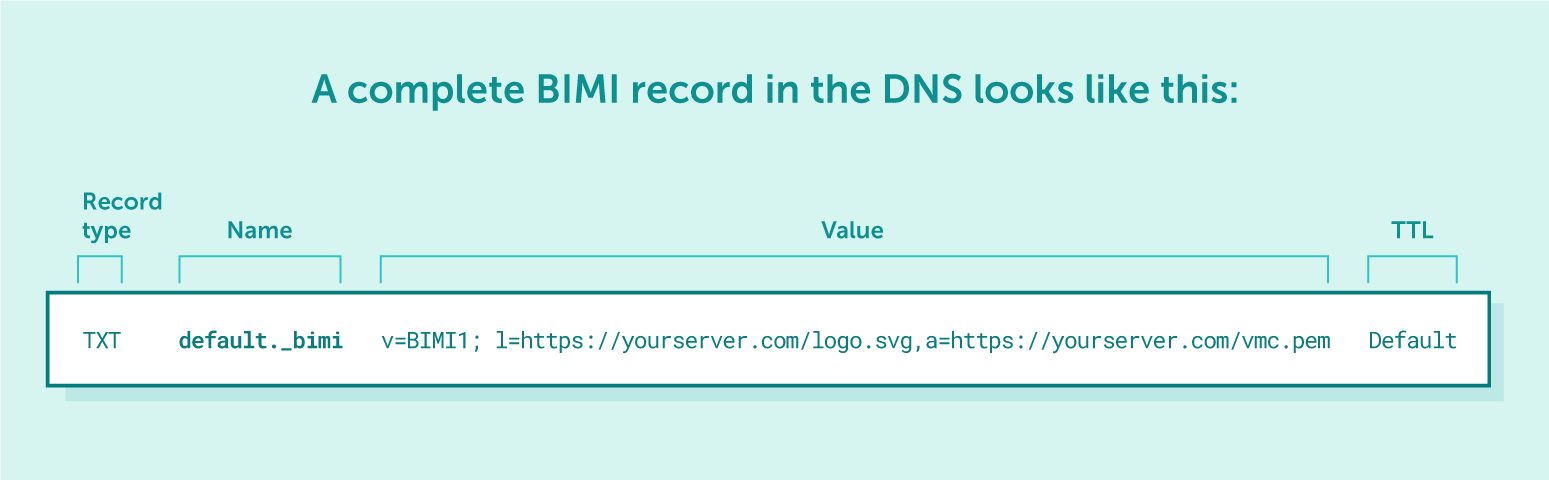
The file type must be saved as a version of the Scaled Vector Graphic (SVG) format. The logo should also be properly scaled and should have a solid background (rather than transparent). The recommended size of the file should not exceed 32 kilobytes, but it can also be significantly smaller.
You can also use an online BIMI record generator to simplify this process.
It is worth noting that to make BIMI work, the domain name must be properly authenticated with SPF, DKIM, and DMARC. Otherwise, BIMI implementation will fail.
When it comes to DMARC, it is necessary to set an enforcement policy (quarantine or reject), which defines what to do in case an email fails both SPF and DKIM checks. Many senders still use a none policy (that will not affect email delivery but will still provide DMARC reports) or do not set it at all.
[Updated on September 26, 2024]
This post has been updated to reflect Google’s support for Common Mark Certificates (CMC), allowing brands to use BIMI in Gmail without needing a trademark. Learn how these updates expand BIMI’s accessibility and what they mean for your email marketing strategy.
The AuthIndicators Working Group (aka. the BIMI Group) has announced the introduction of Common Mark Certificates (CMC), a new addition to Brand Indicators for Message Identification (BIMI), now supported by Google in Gmail. Previously, brands needed a Verified Mark Certificate (VMC), requiring a trademarked logo, to use BIMI. This trademark requirement was often too costly and time-consuming for smaller businesses. However, with the introduction of CMCs, brands can now display their logos in Gmail without needing a trademark, making BIMI more accessible to a wider range of companies.
Alongside this update, Google has introduced several other BIMI changes. The CMC allows brands to display their logos without the verified blue checkmark that comes with VMCs. Additionally, Gmail will now display BIMI’s verified checkmarks on Android and iOS apps, not just on the web version, for brands using VMCs. This rollout will occur over the next few weeks.
Key updates include:
For businesses considering whether to choose a VMC or a CMC, the main distinction lies in the verified checkmark. VMC requires a trademarked logo and provides Google’s blue checkmark, while CMC offers a more affordable and flexible option without trademark requirements but without the checkmark.
These changes, spearheaded by Google, make BIMI more accessible to businesses of all sizes, enhancing brand visibility and trust in email marketing campaigns.
More information about the changes can be found on the BIMI Group and Google Workspace Updates websites.
[Updated on September 12, 2025]
While creating your BIMI TXT record, you’ll work with standard tags like v= (version), l= (logo location), and optional a= (certificate location). However, the BIMI standard is evolving, and a new tag has been introduced to give brands more strategic control over their inbox appearance: the avp tag.
avp stands for Avatar Preference. It allows senders to tell mailbox providers which image should be prioritized when both a BIMI brand logo and a personal avatar (e.g., from a Google account) are available for the same sending address.
It offers two simple settings:
This feature is particularly valuable for marketers focusing on personalization and relationship-building:
Essentially, the avp tag helps you decide whether your campaign should feel more human and one-to-one, or if it should reinforce brand consistency and authority. We recommend running A/B tests with avp=personal vs. avp=brand to measure their impact on open rates, engagement, and brand trust.
This small parameter can make a big difference in how recipients perceive your brand in the inbox.
Considering how easy it is for fraudsters to find and exploit email addresses, appropriate precautions should be taken in order to make your customers feel safe opening our messages. After all, it’s the only effective way to maintain an ongoing relationship with them.
By choosing to implement BIMI, you are signaling that you care about the safety of your recipients and being proactive by providing the highest standard of security to make it effortless to identify the safe sender. There is no need to further educate customers on this issue – instead of podcasts, webinars, or articles that don’t always reach the “average” recipient, you simply point out the authenticated messages with verified, brand-controlled logos.
Notably, such practices can effectively discourage potential fraudsters from trying to impersonate your brand while boosting the sender’s reputation. Now, it will be easy to distinguish emails that are fully protected with a displayed logo from fraudulent ones – i.e., without BIMI implemented. There’s also the added benefit of a higher Open Rate, so you can count on increased conversions.
At EmailLabs, we are fully prepared for the new standard, and our platform fully supports sending BIMI-compliant messages.
However, we want to emphasize that the key implementation and technical configuration process lies with the domain owner. The sender must take care of:
Publishing a DMARC record (with a strict policy of p=quarantine or p=reject),
Preparing the logo file (in the correct SVG format),
Obtaining a VMC (Verified Mark Certificate),
Publishing the final BIMI record in the DNS zone.
Once these elements are correctly configured, our infrastructure will ensure that properly authenticated messages are sent in a manner fully compatible with the BIMI standard.
Do you have any questions? Please get in touch with our Support Team.

Product and Technical Insights Specialist
Natalia abandoned her career as an experimental biologist for the digital universe and new technologies. She likes to know something about everything and everything about something. Breathlessly follows and describes news from the email world. Supports EmailLabs users in integrating, analyzing, and reporting deliverability. Helps to increase domain security with implemented DNS records and BIMI standard, moreover educates on good mailing practices.
See more articles
We live in a world where your customers switch seamlessly between laptops, smartphones, and tablets. They navigate a complex digital ecosystem – checking emails, using mobile apps, and reacting...

We are delighted to announce that Vercom S.A., the company behind the EmailLabs project, has successfully completed the ISO 22301 certification process. This significant achievement underscores our commitment to...

EmailLabs, as part of the Vercom group, proudly announces its full commitment to aligning its ICT services with the latest cybersecurity standards. In response to dynamically changing regulations, the...

We are pleased to announce that MessageFlow, a product from the Vercom S.A. group, has received the prestigious CSA (Certified Senders Alliance) Certification. This recognition not only underscores the...

AI, Antispam, Best practices, Deliverability
C-Level TL;DR: Strategic Takeaways Recipient consent as a foundation (Item 0): Sending email messages without explicit recipient consent (opt-in) poses a significant risk to your sending infrastructure. Attempting to...
AI, Antispam, Best practices, Deliverability
Executive TL;DR: Strategic Takeaways Deliverability Schism: The growing divide between sales automation technologies and the security standards enforced by major global mailbox providers (collectively referred to as MAGY) is...
Modern email systems no longer treat the primary inbox as the default destination for every message. The final classification of an email is the result of a multistage evaluation...
AI, Antispam, Best practices, Deliverability
C-Level TL;DR: Strategic Takeaways Recipient consent as a foundation (Item 0): Sending email messages without explicit recipient consent (opt-in) poses a significant risk to your sending infrastructure. Attempting to...
AI, Antispam, Best practices, Deliverability
Executive TL;DR: Strategic Takeaways Deliverability Schism: The growing divide between sales automation technologies and the security standards enforced by major global mailbox providers (collectively referred to as MAGY) is...
Modern email systems no longer treat the primary inbox as the default destination for every message. The final classification of an email is the result of a multistage evaluation...

Best practices, Maile marketingowe, Marketing E-mails, Transactional Emails
Mass email sending is a critical strategy for business owners, marketers, developers, and nonprofit managers looking to scale their outreach. Whether you are announcing a new product feature, distributing...

Best practices, Marketing E-mails
Customer feedback is the fuel for business growth, but gathering it effectively requires more than just a list of questions. Survey emails remain the most direct channel for understanding...

Best practices, Email Marketing, Pytania i odpowiedzi
Mail merge combines a template document with data to create personalized communications. This technique saves time by automatically generating individualized letters, emails, and labels without manual entry. What Is...

IT & Tech, Pytania i odpowiedzi, Technical
When an email travels from sender to recipient, it passes through several critical components of email infrastructure. At the heart of this journey sits the Mail Transfer Agent (MTA)...

Best practices, Deliverability, Google and Yahoo's Requirements, Pytania i odpowiedzi
The world of email marketing is constantly evolving, and leading mail service providers – Gmail, Yahoo, Microsoft, and Apple – regularly update their guidelines for senders. In recent years,...

Gmail, Google and Yahoo's Requirements
You might have noticed a new item in your Gmail sidebar recently – the “Manage subscriptions” tab, often flagged with a blue notification dot. While Google announced this feature...


