Spam Traps are email addresses used by ISPs, various spam-fighting organizations, and Blacklist administrators to identify and monitor the mailings of senders who do not follow good mailing practices when it comes to verifying their contact databases. The aim of their use is to reduce the amount of spam that reaches our mailboxes every day.
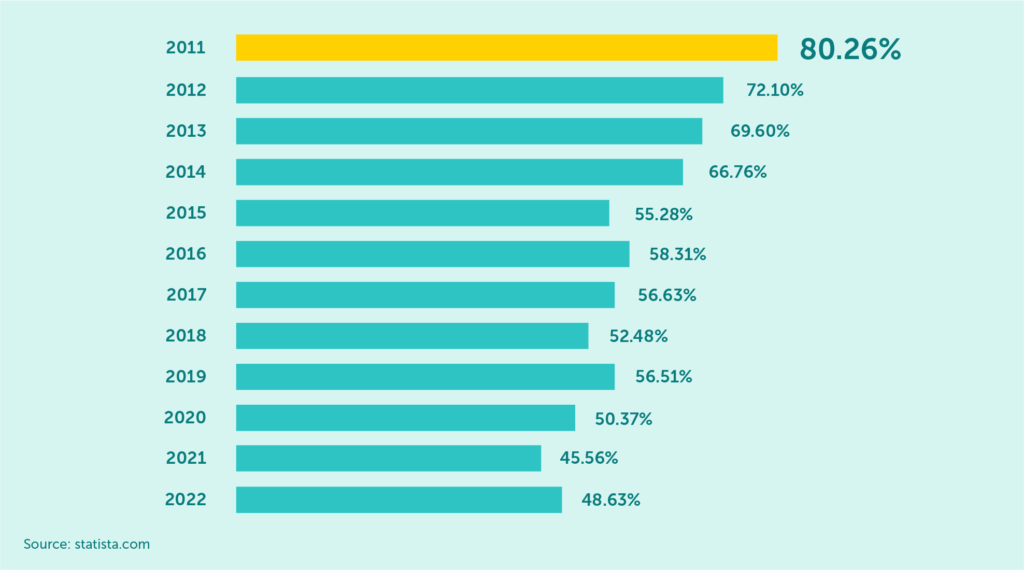
Global spam volume as percentage of total e-mail traffic from 2011 to 2022
There are many types of Spam Traps. Most of the time, Spam Traps are email addresses that have been inactive for a long. They can also be recycled email addresses that were once active but are no longer in use, or they can be newly created addresses that have never been used before. In all cases, however, a Spam Trap set up with the intention of catching senders who do not properly verify their contact lists.
If your mailing list contains these types of email addresses, it may mean you are not taking proper care of its hygiene. This can result in your messages being flagged as spam and your IP address being blacklisted. In the worst case, it can even lead to your email service provider shutting down your account.
Using EmailLabs, you can avoid falling into such a trap, as our system has a built-in Spam Trap address filter. When you send a message to an address on our internal, regularly updated list, the sending will be automatically blocked, and the message will receive a “dropped” status. It is important to note that our tool is not designed to clean old contact databases or to find Spam Trap addresses, so such addresses will not be marked in any additional way. To maintain the high deliverability of emails, always send them only to verified and up-to-date recipients.
That’s why it’s important to be aware of what spam traps are and how to avoid them.
Read on to learn more.
Maximize your email deliverability and security with EmailLabs!
When talking about Spam Traps, it is impossible not to mention a particular type of trap – the Honeypot. In cyber security, this term refers to a strategy that relies on the use of appropriately crafted methods (in this case, email addresses) to detect unauthorized processing and reveal the perpetrator.
Such Spam Traps are particularly troublesome for spammers because ISPs or anti-spam organizations do not wait until an address is in the subscriber’s database and someone accidentally sends an email to it.
These addresses are deliberately promoted and made public directly on websites or embedded in their code. Web scraping bots are able to find such addresses and collect them into their database.
Once emails start reaching the mailbox, the active spammer can be located, blocked, and reported to the relevant organization fighting spam.
This Spam Trap can therefore be compared to a pot of honey exposed to the sun – all you have to do is wait patiently, and the insects will be tempted to fly to it themselves.
We usually only become aware that Spam Traps may be present on our mailing list when the delivery rate starts to drop, and we have checked out other potential causes of this phenomenon.
Identifying specific Spam Trap email addresses is not easy – such information is not publicly available, as it would counter the purpose of their existence – spammers would easily exclude them. However, there are several ways to find potential Spam Traps – the key is to track engagement.
A recipient who doesn’t open your emails for several months, doesn’t complete orders, doesn’t use the password reminder, and doesn’t get in touch with you themselves (technical requests/complaints, etc.) could be a Spam Trap (or soon become one).
To be sure, you can segment your contact group and implement a reactivating campaign only for unengaged recipients. If your emails still do not get opened, remove such addresses from your mailing list. Even if they are not Spam Traps, the lack of any response can mean one thing – the recipients are not interested in receiving any correspondence from you.
There are also a number of paid tools available on the Internet that allow you to check for Spam Traps in your mailing list – some of the more popular ones are, for example, ZeroBounce or Email List Verify. You can upload your contact database to these platforms, and they will analyze it for you.
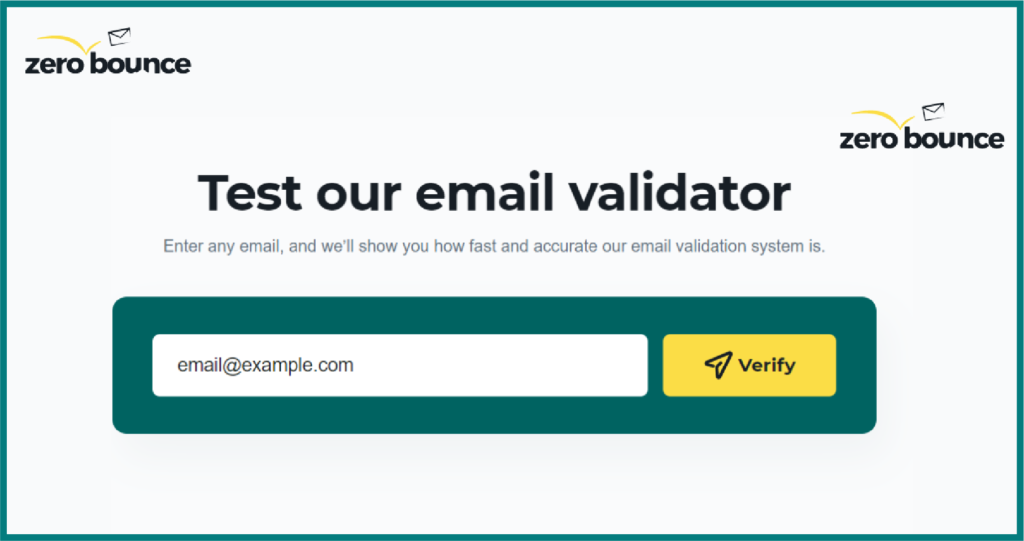
ZeroBounce – email address verification tool
“Spam Traps are an issue that every email marketer needs to be aware of. They can be detrimental to your sending reputation and completely damage the performance of your campaign,”
– says Brian Minick, COO of email validation platform ZeroBounce.“It’s important you are always checking to see if spam traps live on your list. While in theory a good sender would not have them, we’ve seen examples of even the best senders having them added to their newsletter sign-ups maliciously. You never know if they are lurking on your list as, in many cases, they appear to be just a normal looking email address. They’re also being created every day and new ones can appear. It’s critical you get these off and never send to them.
A good validation service such as ZeroBounce can ensure we help get them off your list.”
Fortunately, there are several ways to avoid Spam Traps. The most important thing is to verify the quality of your contact database on an ongoing basis. Some of the foolproof methods you can use to achieve this include the following:
By following these simple rules, you will protect your emailing campaigns against the risk of being trapped by a Spam Trap.
Maximize your email deliverability and security with EmailLabs!
What consequences you face when sending messages to spam trap addresses depends on the type of trap you get ‘caught in.’ If you make a single mailing to invalid addresses with a typo, there should be no reputational impact as long as it involves, for example, registering and sending a double opt-in message (to confirm enrolment), which will shut down further attempts to communicate with the same recipient.
However, multiple mailings to spam trap email addresses (especially a pristine spam trap) can have significant negative consequences – such as a weakening sender reputation, being blacklisted by RBLs, and a decrease in deliverability rates.
The fight against spam is constant. Every day, our inboxes are flooded with emails we do not want.
So let’s remember that Spam Traps are not intended to make it difficult for legitimate senders to carry out their mailings – those who take proper care of the hygiene of their mailing list and send out campaigns only to contacts interested in receiving emails from them, have nothing to fear.
Spam Trap email addresses are allies in the fight against spammers who block visibility in the mailbox for your messages – looking at them this way, you may find them a useful tool.

We are a group of specialists involved in developing substantive and engaging articles on emails and their deliverability. Our value is to be part of the team that creates the EmailLabs service on a daily basis, making our content fully responsive to our audience's questions and problems. Do you have any questions? We look forward to hearing from you :)
See more articles
We live in a world where your customers switch seamlessly between laptops, smartphones, and tablets. They navigate a complex digital ecosystem – checking emails, using mobile apps, and reacting...

We are delighted to announce that Vercom S.A., the company behind the EmailLabs project, has successfully completed the ISO 22301 certification process. This significant achievement underscores our commitment to...

EmailLabs, as part of the Vercom group, proudly announces its full commitment to aligning its ICT services with the latest cybersecurity standards. In response to dynamically changing regulations, the...

We are pleased to announce that MessageFlow, a product from the Vercom S.A. group, has received the prestigious CSA (Certified Senders Alliance) Certification. This recognition not only underscores the...

Modern email systems no longer treat the primary inbox as the default destination for every message. The final classification of an email is the result of a multistage evaluation...

Best practices, Maile marketingowe, Marketing E-mails, Transactional Emails
Mass email sending is a critical strategy for business owners, marketers, developers, and nonprofit managers looking to scale their outreach. Whether you are announcing a new product feature, distributing...

Best practices, Marketing E-mails
Customer feedback is the fuel for business growth, but gathering it effectively requires more than just a list of questions. Email surveys remain the most direct channel for understanding...
Modern email systems no longer treat the primary inbox as the default destination for every message. The final classification of an email is the result of a multistage evaluation...
Best practices, Maile marketingowe, Marketing E-mails, Transactional Emails
Mass email sending is a critical strategy for business owners, marketers, developers, and nonprofit managers looking to scale their outreach. Whether you are announcing a new product feature, distributing...
Best practices, Marketing E-mails
Customer feedback is the fuel for business growth, but gathering it effectively requires more than just a list of questions. Email surveys remain the most direct channel for understanding...

Best practices, Email Marketing, Pytania i odpowiedzi
Mail merge combines a template document with data to create personalized communications. This technique saves time by automatically generating individualized letters, emails, and labels without manual entry. What Is...

IT & Tech, Pytania i odpowiedzi, Technical
When an email travels from sender to recipient, it passes through several critical components of email infrastructure. At the heart of this journey sits the Mail Transfer Agent (MTA)...

Best practices, Deliverability, Google and Yahoo's Requirements, Pytania i odpowiedzi
The world of email marketing is constantly evolving, and leading mail service providers – Gmail, Yahoo, Microsoft, and Apple – regularly update their guidelines for senders. In recent years,...

Gmail, Google and Yahoo's Requirements
You might have noticed a new item in your Gmail sidebar recently – the “Manage subscriptions” tab, often flagged with a blue notification dot. While Google announced this feature...

IT & Tech, Pytania i odpowiedzi, Technical
Efficient email communication isn’t just about sending messages — it also involves integrating email functionality into your business systems and applications. Email APIs (Application Programming Interfaces) serve as the...

One of the most important yet often underestimated elements in shaping a company’s brand perception is the transactional email. In e-commerce, the design of such messages must be carefully...
