
Best practices, Deliverability
Best practices, Deliverability

In today’s digital age, email has become an integral part of our personal and professional communication. We rely heavily on emails to send important messages, documents, and updates. But what happens when an email fails to reach its intended recipient? We will explore the common causes of mail delivery failure and discuss how to fix it.
Mail delivery failure occurs when an email that you have sent fails to reach the recipient’s inbox. Instead, you may receive an error message or notification stating that the email was undeliverable. This can be frustrating, especially when you are relying on email to convey important information.
If your email can’t seem to find its way out of your drafts, one of the following 10 problems may be the reason why.
If your email account has a high complaint rate, it means that your recipients often mark your emails as spam or report them to their email provider. This can lead to your emails being filtered out or blocked entirely. To resolve this issue, make sure to only send emails to recipients who have given you permission to contact them and ensure that your email content is relevant and valuable.

It is worth remembering that, according to the new email deliverability requirements for Gmail, the spam complaint rate should not exceed 0.3% as displayed in Google Postmaster Tools. Yahoo! Mail does not provide exact thresholds for acceptable spam rates, but expects all senders to maintain low complaint rates.
Issues with your email infrastructure can also cause some failures. This includes problems with your email server or an unstable network connection between your email client and the server. Additionally, security software or firewalls on your local machine or network may obstruct email delivery. To fix this, it is advisable to consult with your email service provider or IT department for assistance in troubleshooting and resolving any infrastructure-related issues.
Permission-based problems arise when you send messages to recipients who have not given you explicit permission to contact them.This is particularly relevant in organizational or corporate environments, where email accounts might be restricted by administrators. For instance, some organizations enforce email quarantine policies, where emails from certain senders or with specific content are held for review.

Sending unsolicited emails can be seen as spamming and can result in your email being blocked or flagged. To avoid this, always ensure that you have permission from the recipient before sending them any emails.
If you are emailing invalid or non-existent email addresses, they will inevitably fail to reach their intended recipients. Make sure to double-check the email addresses before sending any emails to ensure their validity. If you receive bounce-back notifications indicating that an email address is invalid, remove it from your email list or update it with the correct address.

It’s not recommended to use your own email infrastructure for verifying or cleaning your recipient lists of invalid email addresses, as this could negatively impact your sender reputation. Instead, consider using specialized services such as ZeroBounce, Bouncer or EmailListVerify.
When a recipient’s mailbox is full or has reached its storage limit, they may not be able to receive new messages. In such cases, your email may bounce back or be delayed. You can ask the recipient to clear their mailbox or adjust their storage settings to make room for incoming emails.

Spam filters are designed to detect and filter out unwanted or suspicious emails. Sometimes, legitimate emails can get caught in filters, leading to delivery failures. To avoid this, ensure that your emails comply with best practices and avoid using spam trigger words. You can also ask your recipients to whitelist your email address to prevent your emails from being flagged.
If your email server’s IP address or domain appears on a blocklist, it can result in delivery failures, as many email providers will automatically reject emails from that IP. Being blacklisted means that your IP address or domain name is associated with a history of spam or malicious activity. Resolving blocklisting issues involves several steps to address the root cause.
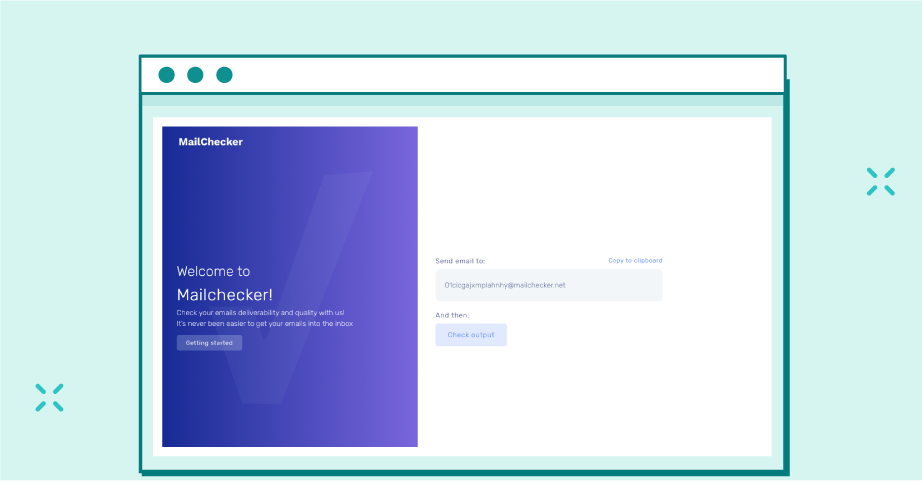
Start by identifying the blocklist using tools like Mailchecker.net. Next, reach out to the relevant organizations or service providers to request delisting or removal from the blacklist, ensuring you provide evidence that you have resolved the issues that led to the blocklisting
If there are issues with your email server, such as downtime or technical glitches, it can prevent your emails from being delivered. In such cases, you can contact your email platform or IT department to investigate and resolve the server issues.

If you are trying to send an email with large attachments, you may encounter delivery issues if the attachments exceed the recipient’s size limit. Many email servers impose a maximum attachment size limit, typically between 10-25 MB. On our platform, the maximum allowable size for an email, including attachment, is 15MB. Consider compressing the attachments or using file-sharing services to send large files.

Sender authentication is an important aspect of email deliverability. If your email server fails the authentication tests, it can lead to unsent messages. Proper configuration of authentication protocols is essential for ensuring that emails are sent in compliance with established rules and originate from legitimate sender. Implementing these protocols not only improves email deliverability but also enhances the security, credibility, and effectiveness of your email communications.
With EmailLabs, you can expect increased security in your email correspondence through the SPF, DKIM, and DMARC.
Sender Authorization – EmailLabs Free Configurator
Maximize your email deliverability and security with EmailLabs!
In some cases, messages not being sent can occur due to issues with the recipient’s email configuration. This can include incorrect mailbox settings or problems with their email platform. If you suspect this to be the cause, you can contact the recipient and ask them to check their email settings or consult with their email service provider for assistance.
Now that we have explored the common causes of email-sending failure, let’s discuss some tips to help you avoid these issues and improve your email deliverability.
Before sending any emails, ensure that you have a stable and active internet connection. Without an internet connection, your emails will not be able to reach their intended recipients.
When configuring your email client, it’s crucial to enter the correct SMTP (Simple Mail Transfer Protocol) parameters. These parameters include the SMTP server address, port number, and authentication settings. Double-check your settings to ensure they are accurate.
If your SMTP server connection is malfunctioning, your emails may not be sent or be delayed. You can try restarting your email client or contact your email service provider for assistance.
The SMTP port number is crucial for establishing a secure connection between your email client and the email server. Using the wrong port number can result in emails not being sent out. Some networks may block certain ports, such as 25, 465, or 587, which are commonly used for sending emails.

Verify the correct port number with your email platform and update your email client settings accordingly.
A Complete Overview of SMTP Port 25, Port 465, and Port 587: How To Choose the Right SMTP Port
Firewall settings can sometimes block outgoing emails, especially if they are misconfigured or overly strict. Adjust your firewall settings to allow outgoing email traffic, or consult with your IT department for assistance.
Moments when you cannot send a simple email can be frustrating and can hinder effective communication. By understanding the common email delivery errors and implementing the recommended solutions, you can improve your email deliverability and ensure that your messages reach their intended recipients.
To minimize delivery issues follow best practices, obtain permission from your recipients before sending emails, and maintain a healthy email infrastructure. Additionally, regularly monitor and update your email settings, verify the validity of recipient addresses, and stay informed about changes in email authentication protocols to further improve the reliability of your email communications.
There are various factors that may prevent your emails from reaching recipients. Typically, the error code or return message from the receiving server provides specific details about the delivery issues. The detailed logs of sent messages, accessible through the EmailLabs panel, offer insights into whether the message was accepted or provide reasons for its rejection.
Email authentication failure occurs when the receiving mail server does not recognize the authenticity of the sender’s email. This can happen if the sender’s domain does not have proper DNS configurations or if the SPF, DKIM, or DMARC authentication fails. To resolve this issue, you may need to update your DNS records or consult with your service provider for guidance.
Check the detailed instructions for set up sender authentication in EmailLabs.
If your email fails to send, first review any error message or bounce-back email you receive. It often provides clues about what went wrong. Double-check the recipient’s email address for any typos. Ensure that you have entered the correct email address and that it is not being blocked or rejected by the recipient’s mail server. Additionally, check your email program’s settings to ensure that you are using the correct outgoing mail server and port number.
While port 25 is the default SMTP port for emails, many ISPs block this port to prevent spam and abuse. To improve email deliverability, it is recommended to use an alternative port, such as port 587, which is commonly used for secure email delivery.
If your emails are being rejected by anti-spam organizations, it is likely because they have identified your email as spam or suspicious. To resolve this issue, review the content of your emails for any spam-like characteristics or keywords that could trigger spam filters. Ensure that your emails are compliant with anti-spam regulations and guidelines, and improve your email’s reputation.
How to Avoid Email Spam Filters and Reach The Inbox?
Your email may be marked as undelivered if it encounters any issues during the delivery process. This could be due to incorrect recipient addresses, network connection problems, or restrictions imposed by the recipient’s mail server. Double-check the recipient email addresses and try resending the email. If the issue persists, contact your email service provider for further assistance.
To avoid being labeled as a spammer in the future, email only recipients who have agreed to receive them. Implement opt-in procedures to ensure that your recipients have explicitly subscribed to receive your emails and provide a clear and easy way for them to unsubscribe from your list. Avoid using misleading subject lines, excessive use of keywords, and sending messages in bulk without proper segmentation or personalization.
If you are unable to send email messages to a specific email address, there could be multiple reasons. The recipient’s mailbox may be full, their email server may be experiencing technical difficulties, or your email may have been blocked or flagged as spam by the recipient’s email program. Contact the recipient through an alternative communication method to confirm the issue and find a solution.
To secure your network connection and enhance email deliverability, ensure that your network is protected by reliable and up-to-date antivirus software. Regularly monitor and scan for any potential malware or malicious activities and perform periodic security audits to identify and address potential vulnerabilities in your network and email systems.
Additionally, consider using encrypted protocols, such as SSL or TLS, for sending and receiving emails to further secure the transmission of sensitive information. Implement strong, unique passwords for your email and network accounts to prevent unauthorized access and enable 2FA to add an extra layer of security.

We are a group of specialists involved in developing substantive and engaging articles on emails and their deliverability. Our value is to be part of the team that creates the EmailLabs service on a daily basis, making our content fully responsive to our audience's questions and problems. Do you have any questions? We look forward to hearing from you :)
See more articles
We live in a world where your customers switch seamlessly between laptops, smartphones, and tablets. They navigate a complex digital ecosystem – checking emails, using mobile apps, and reacting...

We are delighted to announce that Vercom S.A., the company behind the EmailLabs project, has successfully completed the ISO 22301 certification process. This significant achievement underscores our commitment to...

EmailLabs, as part of the Vercom group, proudly announces its full commitment to aligning its ICT services with the latest cybersecurity standards. In response to dynamically changing regulations, the...

We are pleased to announce that MessageFlow, a product from the Vercom S.A. group, has received the prestigious CSA (Certified Senders Alliance) Certification. This recognition not only underscores the...
Compliance & Security, Email Marketing, Security
TL;DR DMARCbis is now official: After years of work by the IETF working group, the DMARC specification has been formally updated. Three new documents, RFC 9989, RFC 9990, and...
Email Marketing, Gmail, New feature
TL;DR Gmail Live: a new feature enabling natural language voice search in the inbox, powered by the Gemini model. AI Inbox and AI Overviews: a revamped inbox interface featuring...
Best practices, Best practices, Email Authentication
TL;DR: Strategic Takeaways for C-Level and Marketing Leaders DKIM2 is not a minor DNS configuration update. It is a systemic response to two critical business problems: Replay attacks: scenarios...
Compliance & Security, Email Marketing, Security
TL;DR DMARCbis is now official: After years of work by the IETF working group, the DMARC specification has been formally updated. Three new documents, RFC 9989, RFC 9990, and...
Email Marketing, Gmail, New feature
TL;DR Gmail Live: a new feature enabling natural language voice search in the inbox, powered by the Gemini model. AI Inbox and AI Overviews: a revamped inbox interface featuring...
Best practices, Best practices, Email Authentication
TL;DR: Strategic Takeaways for C-Level and Marketing Leaders DKIM2 is not a minor DNS configuration update. It is a systemic response to two critical business problems: Replay attacks: scenarios...

AI, Antispam, Best practices, Deliverability
C-Level TL;DR: Strategic Takeaways Recipient consent as a foundation (Item 0): Sending email messages without explicit recipient consent (opt-in) poses a significant risk to your sending infrastructure. Attempting to...

AI, Antispam, Best practices, Deliverability
Executive TL;DR: Strategic Takeaways Deliverability Schism: The growing divide between sales automation technologies and the security standards enforced by major global mailbox providers (collectively referred to as MAGY) is...

Modern email systems no longer treat the primary inbox as the default destination for every message. The final classification of an email is the result of a multistage evaluation...

Best practices, Maile marketingowe, Marketing E-mails, Transactional Emails
Mass email sending is a critical strategy for business owners, marketers, developers, and nonprofit managers looking to scale their outreach. Whether you are announcing a new product feature, distributing...

Best practices, Marketing E-mails
Customer feedback is the fuel for business growth, but gathering it effectively requires more than just a list of questions. Survey emails remain the most direct channel for understanding...

Best practices, Email Marketing, Pytania i odpowiedzi
Mail merge combines a template document with data to create personalized communications. This technique saves time by automatically generating individualized letters, emails, and labels without manual entry. What Is...

